
Technical Data Packages: What Are They, How to Use Them, and How 3D PDFs Can Help
Technical data packages (TDPs) are supposed to provide manufacturers and other stakeholders with all the CAD, design, or manufacturing information they need to do their jobs. Far too often, they instead serve as a clunky pile of poorly versioned files that create endless frustrations. As engineering data is used throughout more and more of the business, many organizations are looking for better ways to facilitate their engineering data sharing.
In this piece, we will explore what TDPs are, how so many teams use them wrong, and how changing the structure and format of your data packages can eliminate the barriers and slowdowns caused by poor data sharing techniques.
What is a Technical Data Package?
A TDP is a collection of documents that contain all the information needed to understand or manufacture a part. While essential for manufacturing, modern workflows use this data in production, inspection, engineering, logistics, maintenance, and more.
TDPs are far more than a single file or 3D model, bounced around as an email attachment. The data package should act as a shared point of reference for any manufacturing information.
A complete TDP needs to answer more than "what does the part look like?" Examples of what a TDP could include are:
Geometric definition — dimensions, tolerances, and GD&T that define the part's form and how it's allowed to vary
Material and process specifications — what the part is made from, and any required treatments, coatings, or finishes
Product manufacturing information (PMI) — annotations tied to specific features: surface finish callouts, weld symbols, datum references
Bill of materials — every component, sub-assembly, and fastener needed to build or assemble the part
Inspection and acceptance criteria — what needs to be measured or tested, and what counts as a pass
Revision and approval history — who signed off, when, and what changed between versions
When done properly, they allow every stakeholder to work on a part and know they are looking at the same up-to-date information as everyone else.
In practice, teams often pull this information together from a mix of CAD models, 2D drawings, spreadsheets, PDFs, Word documents, and more. If not handled carefully, this approach to building TDPs can cause a ton of issues.
With so many moving parts, each requiring different applications and levels of technical knowledge, files get lost, versioning issues run rampant, and teams end up out of sync and frustrated. For CAD data, some stakeholders may not even be able to open the files without expensive engineering software. The result is a data sharing system full of delays and unnecessary expenses.
Clearly, there has to be a better way to share this information.
The Benefits of a Structured TDP
A structured TDP allows recipients reliable access to all of the information they may need in a single location. Instead of being scattered across inboxes, shared drives, and individual applications, all teams have access to one package that updates whenever changes are made. The benefits of such a system include:
Clearer communication — When engineering, manufacturing, and suppliers can all reference the same set of documents, there is far less room for misinterpretation. Plus, questions can be answered by the TDP instead of requiring a meeting.
Easier onboarding and collaboration — Bringing a new engineer up to speed or moving work to a new partner/supplier becomes a matter of providing a TDP rather than relying on a series of explanatory calls.
Control over IP — Choosing what goes into a TDP is also a way of controlling what leaves your organization. That control becomes particularly important when sharing design information with third-party manufacturers, suppliers, and other partners.
3D PDF as a TDP Container
While having a single source of truth is essential, it means nothing if the data is difficult to share or simply too complicated or time-consuming to access for the stakeholders. This is where format matters as much as content.
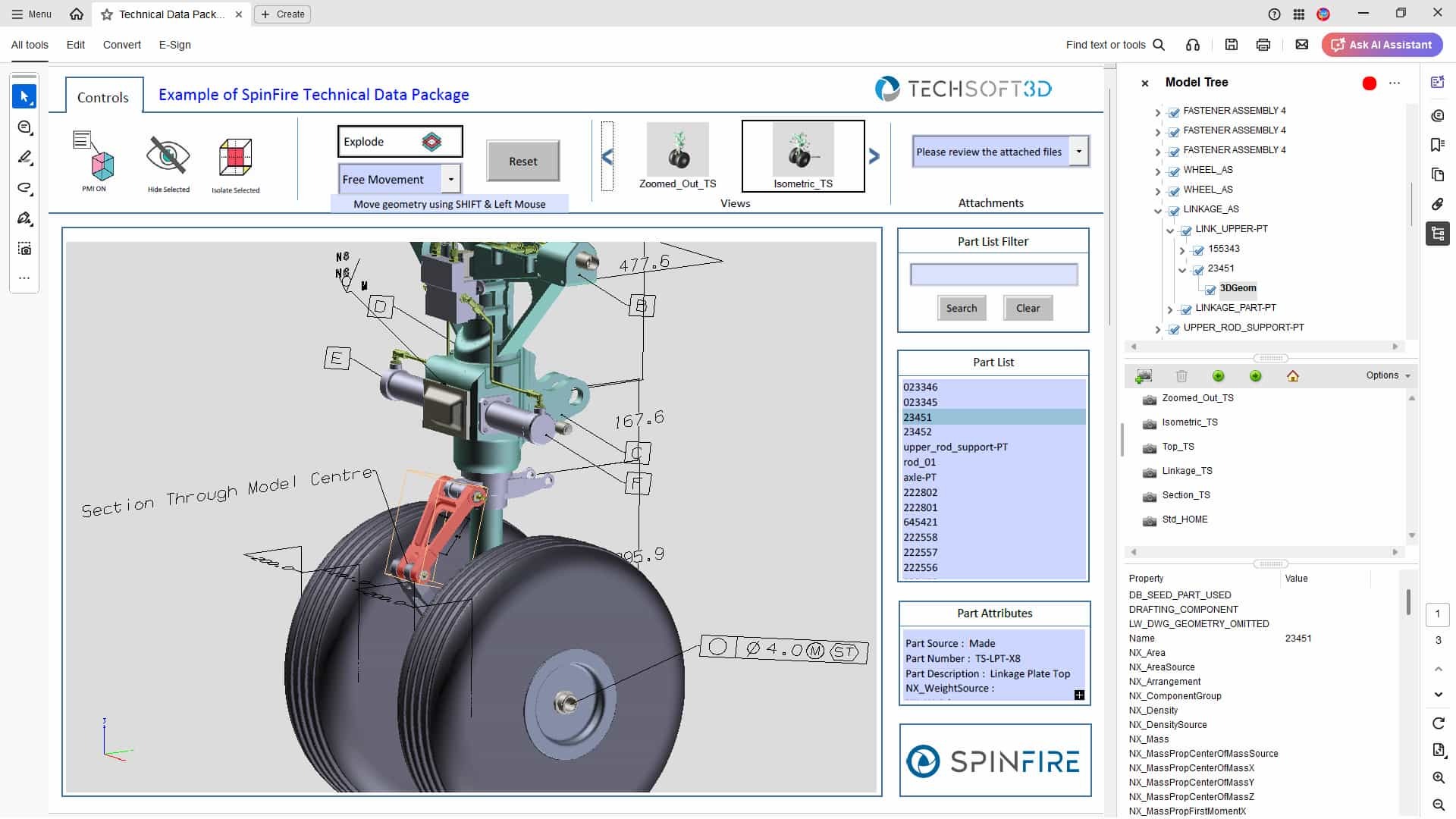
3D PDFs are an excellent fit as TDPs, balancing accessibility and ease of use with the ability to hold all of the data needed for every stage of engineering and manufacturing workflows.
The 3D CAD model that is at the center of modern engineering is fully interactive, enabling users to rotate it, take measurements, create section views, and isolate components. These models can also include PMI taken directly from the native CAD, so model-based definition data travels with the model.
Supporting documents can be attached directly to the 3D PDF, allowing 2D drawings, spreadsheets, presentations, and other relevant product information to be delivered inside the same file. By including everything within a single file, nothing gets separated while sending the TDP.
Since 3D PDFs can be opened with the free Adobe Acrobat Reader, they also make this information more widely accessible, even to recipients who don't have access to CAD software.
There are security advantages to a 3D PDF as well. You can share an accurate representation of your CAD model without needing to share the CAD file itself. You can also include security features such as password protection, encryption, watermarks, restrictions on printing and copying, and expiry dates.

3D PDF and The Shift Toward Model-Based Definition
That ability to carry PMI directly on the 3D model isn't just a convenience; it's part of a broader shift in how TDPs are built. TDPs have historically been 2D drawing-based, with the 3D model treated as a convenience. Model-based definition (MBD) changes that. The annotated 3D model becomes the main source of knowledge, with PMI, GD&T, and other annotations placed next to the geometry.
There are multiple benefits to this. Firstly, there's less room for misinterpretation when PMI sits next to the feature it applies to, and it's easier to maintain as designs keep changing. Teams also use MBD as a part of their efforts to push towards paperless workflows.
Of course, there are still places where 2D drawings may be better suited or simply preferred in individual use cases. The ability to seamlessly include them as part of a TDP built around MBD allows you the best of both worlds, without modifying how you share data.
Standards and Compliance
For defense and government work, MIL-STD-31000 sets out how a technical data package should be structured and what information it should contain. Other industries have their own expectations, whether formally specified or established by convention. Since a 3D PDF template defines both the structure and the content of a TDP up front, it becomes straightforward to publish packages that meet these standards every time.
Publishing TDPs with SpinFire Convert
SpinFire Convert can publish 3D PDF technical data packages directly from your CAD software, so there is no need to reform data, recreate views, or capture screenshots.
With the TDP template, the structure and content are the same every time. Rather than checking a package against a list before it goes out, the template ensures all the relevant engineering information, tailored to the recipient, is included by default. SpinFire Convert can also publish multiple templates simultaneously, so a supplier, a manufacturing team, and a sales team can each receive a TDP with the data most relevant to their needs.
For teams producing documentation at volume, batch publishing handles large quantities of data in a single run, and command-line publishing allows TDP generation to be triggered as part of a wider PLM or release workflow.
Getting Complete Packages to the People Who Need Them
A technical data package is only useful if the recipient can open it and trust the integrity of the data inside. 3D PDF can allow you to deliver information in a format that works for suppliers, inspectors, and customers regardless of what software they have access to. With the TDP template from SpinFire Convert, streamlining your data sharing process has never been more accessible.
For more information, our post on 3D PDF templates covers the individual template types. Or, learn more about SpinFire Convert here.