

Visualize SOLIDWORKS Data Without SOLIDWORKS Using SpinFire Insight
Dassault Systèmes SOLIDWORKS is a juggernaut in CAD, being one of the most widely used applications for product design and manufacturing across dozens of industries. Because so many teams already work in SOLIDWORKS, collaborating with partners who use the same format is straightforward. However, collaborating with non-technical users or teams with other CAD formats is more complicated.
SOLIDWORKS’ .SLDPRT, .SLDASM, and .SLDDRW files are essential throughout the product lifecycle of the companies they serve, but sharing that data can be difficult when not every stakeholder has access to native CAD software. A full SOLIDWORKS license is often unnecessary for users who only need to review a model and don't need a CAD license.
A SOLIDWORKS CAD viewer solves this problem, allowing anyone to open, review, and analyze SOLIDWORKS data without installing or licensing SOLIDWORKS. In this piece, we cover:
Why Use a SOLIDWORKS Viewer?
Many teams across an organization can benefit from viewing a model without requiring the full functionality of a CAD license. SOLIDWORKS, despite its popularity and powerful feature set, is not a cheap application. Providing licenses for everyone in departments that would never touch the vast majority of the engineering applications features is a significant waste.
To get around this, companies try cheaper, inefficient workarounds for sharing information to non-CAD users. These can include screenshots sent through emails, PDFs, exported neutral files, or constantly pestering engineers to open up and convert data for others
This is where a dedicated SOLIDWORKS viewer becomes useful. A CAD viewer helps organizations make SOLIDWORKS files more accessible, allowing everyone to open, review, measure, markup, and analyse the data they need instead of requiring every stakeholder to have a full CAD license.

How SpinFire Insight Helps Visualize SOLIDWORKS Data
SpinFire Insight allows organizations to view SOLIDWORKS files without a SOLIDWORKS license, making CAD data more accessible across the business. SpinFire Insight also offers a range of CAD analysis tools to:
Take measurements
Add markups and annotations
Generate section views
Review assemblies and components
Perform draft analysis
Evaluate curvature
Analyze wall thickness
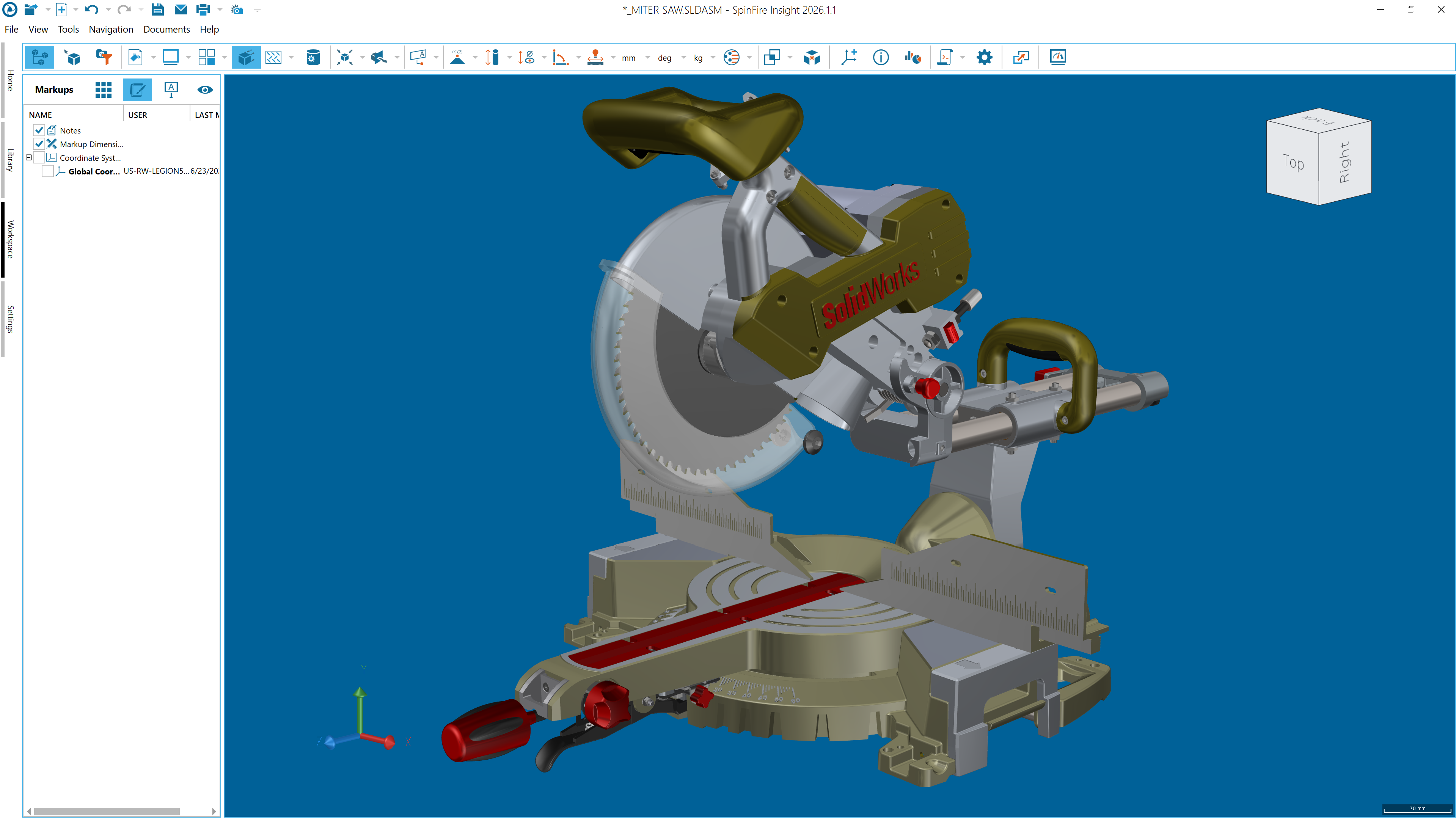
SpinFire Insight also supports a wide range of native and neutral CAD files beyond SOLIDWORKS, making it a great option for organizations that work across multiple CAD systems. In addition to SOLIDWORKS, teams can use the same CAD viewer to access other major file formats such as STEP, JT, Creo, and CATIA V5 across engineering and manufacturing workflows.
Because it's built to be easy and intuitive to use, non-technical users can fully benefit from SpinFire Insight without a steep learning curve. With enterprise licensing, SpinFire Insight is easy to deploy across the entire business, so every team that needs to view SOLIDWORKS data can get direct access to the same design information.
Check out the full capabilities of SpinFire Insight here, or better yet, trial it for yourself. You can also get in touch to learn more about how SpinFire can help you.
Learn more about The Benefits of CAD Visualization Across the Enterprise
Why is SOLIDWORKS so widely used?
SOLIDWORKS is known for its intuitive interface and broad industry adoption. Its approachable learning curve and large user base make it a common choice for design teams, suppliers, and partners who need to collaborate on shared CAD data.
Can I open SOLIDWORKS files without SOLIDWORKS?
Yes. CAD viewers such as SpinFire Insight allow users to open and view SOLIDWORKS files without installing or licensing SOLIDWORKS.
What is the best SOLIDWORKS viewer?
The best SOLIDWORKS viewer depends on your requirements. SpinFire Insight is a strong choice for organizations that want to offer CAD visualization tools to everyone in the enterprise.
Who needs a SOLIDWORKS file viewer?
SOLIDWORKS file viewers are useful for manufacturing teams, quality engineers, purchasing departments, suppliers, sales teams, project managers, and other non-CAD users who need to access product data without full CAD authoring tools.
Does SpinFire Insight support CAD formats other than SOLIDWORKS?
Yes. SpinFire Insight supports a wide range of native and neutral CAD formats, allowing users to work with data from multiple CAD systems in a single application. You can explore all supported formats here.
Can non-engineers view SOLIDWORKS files?
Yes. SpinFire Insight is designed to make CAD data accessible to users across the organization, including non-technical users who need to view, measure, markup, or analyse SOLIDWORKS data without working in SOLIDWORKS.