

How to Visualize Creo Data Without Creo Using SpinFire Insight
PTC’s Creo is a widely used CAD format, commonly relied on in the automotive, aerospace, and industrial machinery industries. It connects directly with the popular PTC Windchill, making it a strong fit for organizations already using Windchill for product lifecycle management (PLM). The application’s native .prt and .asm files preserve design and engineering data that drive manufacturing workflows.
While Creo data is essential throughout the design and manufacturing process for many organizations, sharing this data can be difficult when not every stakeholder has access to the native CAD software. Despite this, a full Creo license is usually an unnecessary cost for users who only need to review a model and don't require full design functionality.
A Creo CAD viewer solves this problem by allowing anyone to open, view, and analyze Creo data without installing or licensing Creo itself. In this piece, we cover:
These strengths make Creo data valuable well beyond the engineering team, but that value depends on being able to share it with the people who need it.
Why Use a CREO Viewer?
As engineering data is leveraged through more and more of the company, accessing Creo formats becomes crucial throughout organizations. From traditional design and engineering workflows through to manufacturing, purchasing, sales, and supplier collaboration, engineering data has become broader business data. That value is limited when only a small number of users can access the data.
Companies are caught in a tricky situation, where providing everyone with access to PTC Creo itself is expensive and prohibitively complex for non-engineers. Many try ineffective workarounds, like PDFs, screenshots, and neutral files. These fail to provide the benefits of true CAD access, while being logistically difficult and terribly inefficient. This is a gap that CAD viewers can fill.

Visualize Creo Data with SpinFire Insight
A CAD viewer helps organizations make .prt and .asm files more accessible, allowing everyone to open, review, measure, markup, and analyze Creo data. Instead of requiring every stakeholder to have a full CAD license, SpinFire Insight gives teams an easier way to view and analyse Creo data.
With SpinFire Insight’s enterprising licencing teams across the organization can view Creo files without a Creo license, ensuring everyone has access to the data they need. Users can open Creo data and interact with models through an intuitive CAD viewer designed for both technical and non-technical users.
With SpinFire Insight, users can:
View Creo files
Measure geometry
Create markups and annotations
Generate section views
Review assemblies and components
Perform draft analysis
Evaluate curvature
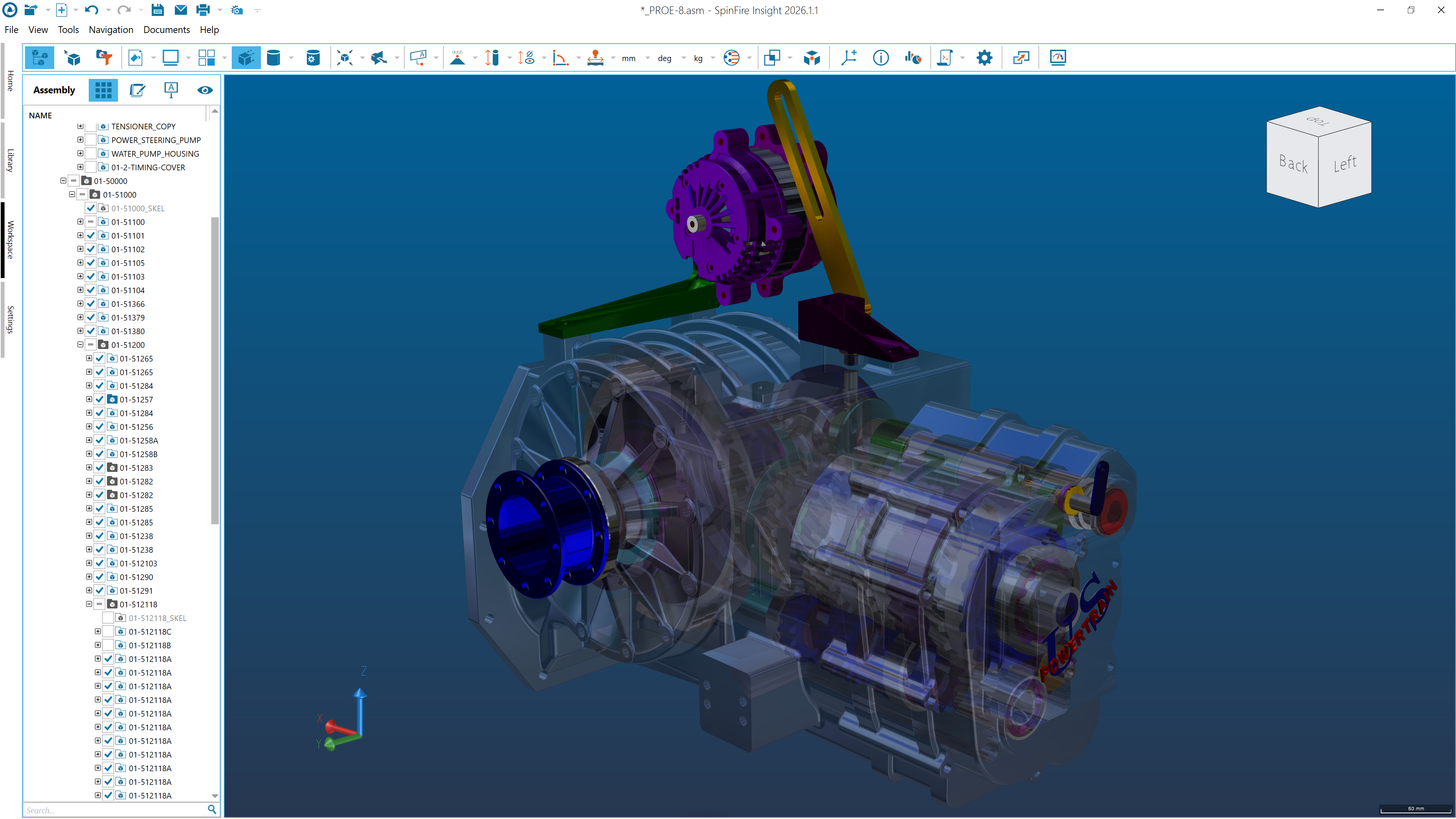
Analyze wall thickness
And much more
SpinFire Insight also supports a wide range of native and neutral CAD files, making it useful for organizations that work with more than one CAD system. In addition to Creo, teams can use the same CAD viewer to access other major file formats such as STEP, JT, and CATIA V5 across engineering and manufacturing workflows.
Make CREO Data Accessible Across Your Organization
Creo data can be valuable across the entire business. With a simple way to visualize and analyze Creo files, organizations are able to improve collaboration, reduce software costs, and speed up decision-making.
SpinFire Insight helps make Creo data available to everyone who needs it, regardless of their CAD experience.
Check out the full capabilities of SpinFire Insight here, or better yet, trial it for yourself. You can also get in touch to learn more about how SpinFire can help you.
Why is Creo so widely used?
Creo is known for its parametric modelling, top-down design tools, and large assembly management, making it a strong fit for industries like automotive, aerospace, and industrial machinery. Its integration with Windchill also makes it a natural choice for organizations using this PLM system.
Can I open Creo files without Creo?
Yes. CAD viewers such as SpinFire Insight allow users to open and view Creo files without installing or licensing PTC Creo.
What is the best Creo viewer?
The best Creo viewer depends on your requirements. SpinFire Insight is a strong choice for organizations that need to give teams throughout the enterprise the ability to view Creo files along with other native and neutral CAD formats while also using measurement, markup, and analysis tools.
Who needs a Creo file viewer?
Creo file viewers are useful for manufacturing teams, purchasing departments, sales teams, project managers, and other non-CAD users who need to access product data without full CAD authoring tools.
Does SpinFire Insight support CAD formats other than Creo?
Yes. SpinFire Insight supports a wide range of native and neutral CAD formats, allowing users to work with data from multiple CAD systems in a single application. You can explore all supported formats here.