
How Can You Use Scan Data in Extended Reality
Measurement errors cost resources. From factory delays and renovations to iterating on new product designs, even the smallest inaccuracies lead to slowdowns and frustrations.
3D scanning technology provides the ability to rapidly create accurate digital models of real-world environments and objects. When paired with Extended Reality (XR) technology, this data can be visualized, evaluated, and iterated back in the real world.
The are many benefits of using scan data in XR:
Create XR assets and environments that accurately reflect reality.
Review layout designs digitally before committing to physical changes.
Reduce errors by basing designs on real-world geometry.
Improve collaboration with teams all experiencing the same immersive XR scene.
Test layout changes virtually against the scanned environment for quicker design cycles.
In this blog, we highlight the power of both scan data and how you can combine it with XR to turn weeks of evaluating costly mistakes into intuitive, collaborative innovation.
What is Scan Data?
3D scanning technology produces a point cloud – a set of points in 3D space that collectively produce a model. This data can be used to represent anything from simple, single-part objects to assemblies all the way to entire environments, with varying levels of detail.
Since each point represents a specific location on an object/environment, these models are incredibly accurate when precise scanning methods are used.
As you might expect, scan data is perfectly suited to creating models where accuracy to pre-existing objects is vital. In practice, this is commonly used for large-scale models like in architecture or construction, or other areas where trying to get precise measurements for your digital version can prove difficult.
3D scans may also be used on a smaller scale as a way of quickly producing models, particularly if many models are needed or when objects are oddly shaped and difficult to create otherwise. This is valuable for a wide range of uses, from video game assets to 3D printing parts to repair appliances, or even museums building replicas of artifacts.
How Can You Use Scan Data in XR?
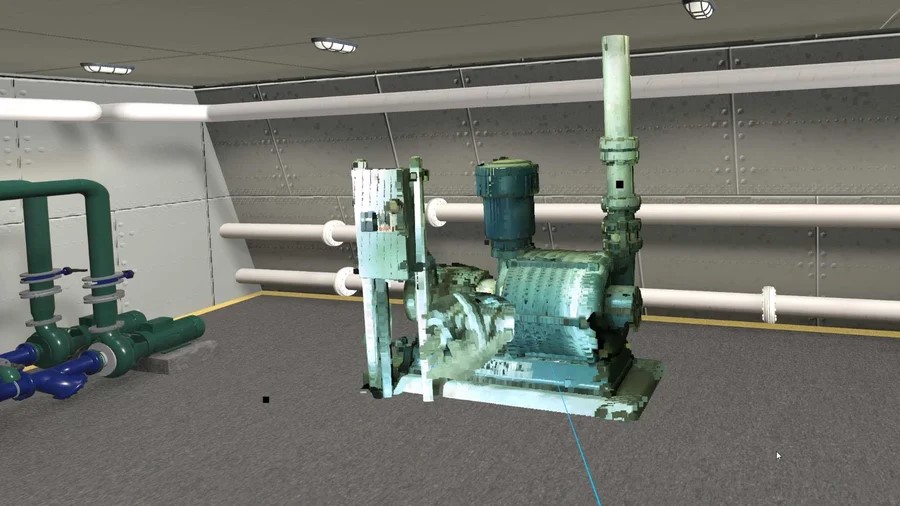
Scan data gives you a powerful digital capture of the real world. XR lets you stand inside it. Instead of rotating models on a monitor or guessing while in the factory, teams can walk the floor and visualize everything, from clearances and safety paths to equipment placement and more.
Extended Reality (XR) can help you visualize these huge models, providing a sense of scale that you can’t find on a computer screen. Combined with the precise nature of scan data, XR improves decision-making by helping you to contextualize this large-scale data.
Since these scans are accurate to the real-world dimensions, it becomes easy to catch errors like mis-aligned equipment or structural constraints which may otherwise cause delays.
Combining XR visualization with scan data can enable team members from all around the world to work together on a digital model without flying in to access the real thing. The intuitive visualization of the system allows those with less CAD experience to better contribute their perspectives.
In summary, scan data and XR can allow teams to experience their plans, rather than simply imagining them, all without spending a dollar in the real world.
How To Combine Scan Data with XR – SpinFire XR
With automated data preparation and immersive XR experiences, SpinFire XR helps teams easily visualize and interact with their data in Augmented, Mixed, and Virtual Reality. When it comes to factory planning, the Factory Layout Experience is a great tool for designing and validating production environments, allowing you to visualize plans before implementing them.
Using scan data in SpinFire XR is simple. With the Visualization Pipeline you can simplify preparing and optimizing your data for XR. This is a fully automated process that can also be run in batch mode and integrated with your PLM system, reducing manual effort and easily fusing with current workflows. SpinFire XR also allows you to combine scan data with traditional CAD. This means you can overlay CAD models with scanned environments, allowing you to ensure that intended equipment layouts will fit in their planned locations.
You can also facilitate collaboration with SpinFire XR. We have XR experiences, such as the Factory Layout Experience and the Design Review Experience, that support collaborative working, allowing people from multiple locations to join live XR sessions. When collaborating in SpinFire XR users can join from multiple locations, from desktop, tablet, or with an MR/VR headset, and all view and interact with the same design in real time. Teams can interrogate models by moving and rotating parts, leave comments, and visualize models at full scale all while in the same session, this immersive collaboration can facilitate in-depth discussions, help refine designs, and improve efficiency.
With the factory layout experience, your team can walk through a scanned factory layout together, ensuring that everyone can see the same real-world geometry. This reduces the need for travel and speeds up decision making; it can be especially useful for non-technical users to get a better understanding of designs in XR to ensure interpretations are aligned.
How Can SpinFire XR Benefit You
With the combination of highly accurate scan data and immersive XR, teams can collaborate easier, spot issues earlier, and make better-informed decisions.
SpinFire XR streamlines this process, enabling organizations to work with multiple data types, including both CAD and scan data, in the same XR session. Plus, the factory layout experience provides a dedicated tool to utilizing scan data in one of its most useful applications. If you’re looking to learn more about how you could use your scan data in XR or about SpinFire XR as a whole, be sure to speak with our team today.
What is a point cloud?
A point cloud is a collection of many individual points collected from 3D scanning technology. Each point represents a point on a real world object, allowing extremely accurate models to be created.
How can scan data be used in XR?
Scan data provide highly accurate models of environments and objects that are often large scale and difficult to understand on a computer screen. XR gives you a way to visualize this scan data at full scale, helping contextualize designs and, in cases like factory layout design, catch errors like misaligned equipment.
How can Tech Soft 3D's tools help you utilize scan data inXR?
With SpinFire XR you can automatically prepare and optimize scan data for use in XR. You can also combine this scan data with CAD and other types of data.