
Improving CAD Data Access in Mold and Die Workflows
For mold and die teams, creating CAD data is rarely the bottleneck (this is the bit designers and engineers tend to like, after all). The major frustrations start when it comes time to share data between OEMs, toolmakers, suppliers, and other teams, all working on their own systems with distinct formats.
Once this data is initially shared, teams are constantly hunting each other down to check that they have the latest version. This friction inevitably creates delays, ineffective workarounds, and small problems spiralling into big slowdowns in production.
In this piece, we will break down the major causes of these data sharing failures, how traditional workarounds fall short of solving the problem, and show how some powerful applications and workflow changes can unlock your mold and die teams' potential.
Why Data Sharing Breaks Down in Mold and Die Projects
The diversified nature of mold and die projects rely on close collaboration between OEMs, toolmakers, suppliers, and manufacturers, before even accounting for the data sharing needs of internal design, tooling, manufacturing, and quality teams. Even the term “mold and die” is broad, referring to companies in tooling industries, moldmaking, precision manufacturing, manufacturing tooling, industrial tooling, and more, with each of these having subcategories and niches of their own.
Very few of the players in this diversified market are using the same all the same systems, and almost none have identical formats, needs, and expertise levels.
Then, there is the CAD data itself. The mold and die industry presents plenty of unique challenges to data sharing, including:
Multi-layered part models, including cooling channels, ejection systems, etc
Complex cooling simulation data, essential for refining and validating parts
Extremely tight tolerances and manufacturing constraints
Highly iterative workflows involving many parties
Large, complex assemblies
Detailed, difficult-to-convey design intent
Why Traditional Collaboration Approaches Fall Short
When data sharing fails, files can’t be opened or interacted with in the way that’s needed. Because of this, teams fall back on ineffective workarounds, like:
Screenshots and static exports
Neutral file formats with limited detail
Back-and-forth emails to clarify design intent
These approaches slow down communication and increase the risk of misinterpretation. In mold design, even small issues can lead to defective parts, rework, or delays in production.
With cheap workarounds failing, some companies try to address the problem by investing in multiple CAD licenses to cover every format they might encounter. This quickly becomes expensive and inefficient. Most users don’t need full CAD functionality; they simply need to open, review, and analyse models, meaning full CAD licenses are a huge cost for features that do nothing to improve productivity.
When new potential customers work with an unsupported format, it can stall projects before they even begin.
Unsupported formats can:
Slow quoting
Delay design reviews
Prevent teams from responding quickly to new opportunities.
In some cases, teams are forced to turn work away simply because they can’t access the data.
A More Practical Approach to CAD Data Access: CAD Viewers
Instead of expanding access to full CAD systems, many teams are adopting 3D CAD viewers as a more efficient alternative.
CAD viewers allow users to open and review models from multiple CAD formats without relying on the original authoring system. This makes it easier to validate designs, share feedback, and keep projects moving, all without adding licensing overhead.
For mold and die workflows, this shift is especially valuable. CAD Viewers allow teams to ensure they are working from the same data, creating a single source of truth for the decision-making and iteration that is so critical in this industry. Design, tooling, manufacturing, and other teams such as quality, purchasing, and supplier teams can review incoming designs immediately, rather than waiting for conversions or additional software access.
How SpinFire Insight Supports Tooling Workflows
SpinFire Insight is designed to address these challenges unique to the mold and die industry by giving teams direct access to CAD data, regardless of format. Instead of working around file compatibility issues, teams can focus on validating and improving designs.
The software includes design review, validation, and measurement tools that allow users to carry out precise inspections directly on 3D models. With features like wall thickness analysis to spot warping and structural issues, your team can better identify defects long before they spiral into product issues and delays.
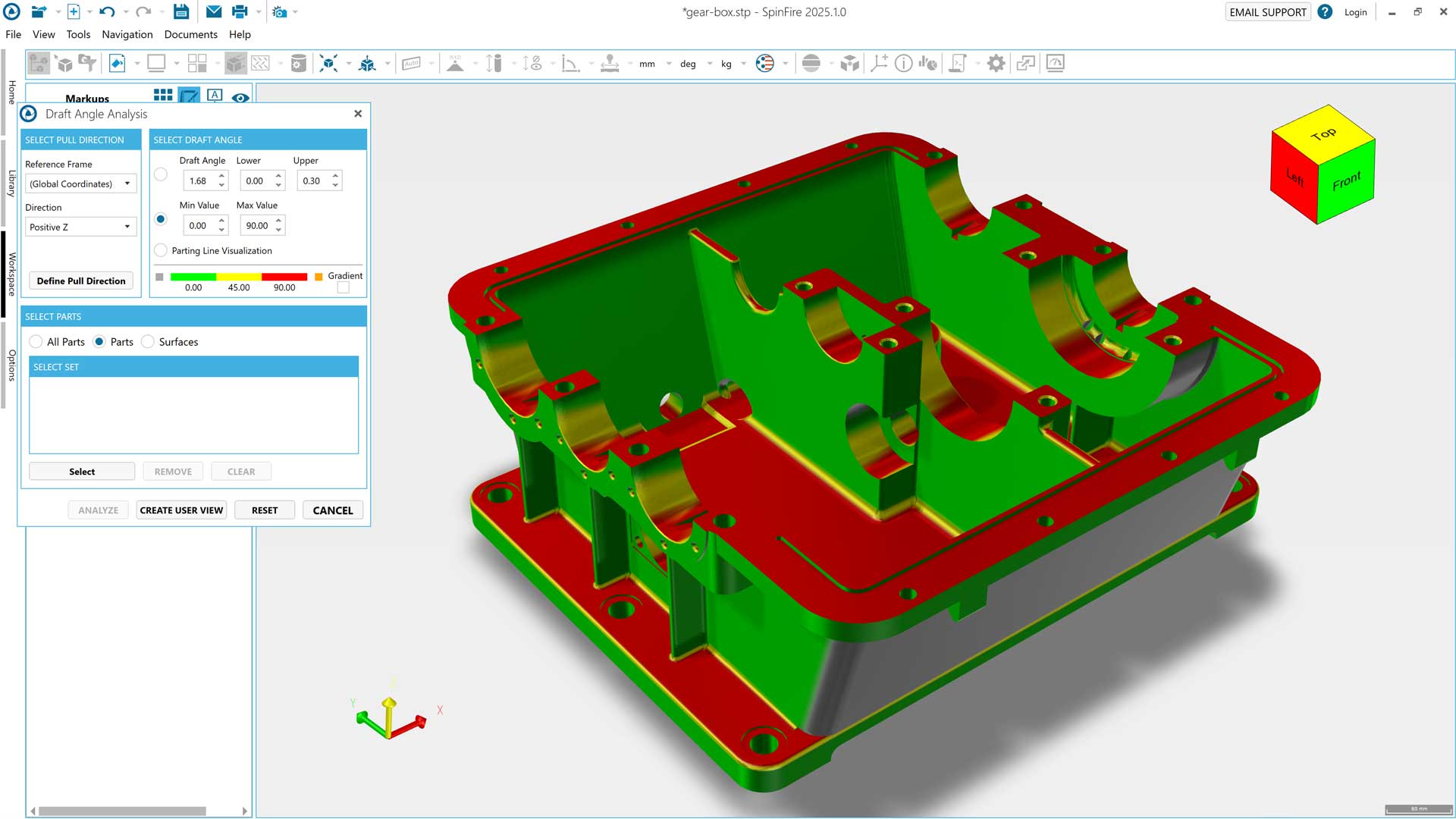
Draft analysis ensures that parts will be released from the mold smoothly, reducing the risk of damage to the surface or problems caused by uneven cooling during production.
SpinFire Insight also includes volume and weight calculation tools that support material and cost estimations.
SpinFire Insight by Tech Soft 3D is easy to use, eliminating the need for the extensive training time associated with full CAD suites. By providing access to design data to the entire enterprise, bottlenecks are reduced, and workflows can be streamlined without needing to provide costly CAD licenses to people who only need to view and analyse data.
SpinFire Insight helps establish a consistent, shared understanding of the design, reducing miscommunication and improving decision-making.
Extending Workflows with CAD Data Translation
While many mold and die workflows only require viewing and analysis, there are cases where CAD data needs to be translated into different formats. This is especially common when working with external suppliers or customers who rely on specific CAD systems.
With SpinFire Convert, CAD files can be easily translated into other formats, streamlining data exchange with customers and suppliers who use different CAD systems. The application supports simple drag-and-drop translation for one-off needs, as well as bulk translation and PLM integration for teams working with high volumes of CAD data.

Improving Collaboration Without Increasing Complexity
As mold and die projects become more complex, the ability to move data efficiently between teams becomes increasingly important.
Relying on multiple CAD systems, manual workarounds, or disconnected workflows creates unnecessary friction. It slows down collaboration, increases the risk of errors, and makes it harder to respond quickly to new opportunities.
By making CAD data more accessible without adding complexity, tools like SpinFire Insight and SpinFire Convert help teams work more efficiently across the entire workflow.
Next Steps
If your team is still relying on workarounds to manage CAD data across different systems, it may be time to look at a more flexible approach.
Explore how SpinFire Insight and SpinFire Convert can help you:
Access and review multiple CAD formats without additional licenses
Identify design issues earlier in the process
Improve collaboration across internal and external teams
Mold & Die Data Access Frequently Asked Questions (FAQs)
Why is CAD data access important in the mold and die industry?
Mold and die projects involve many specialized teams, suppliers, and customers working across different CAD systems and file formats. Because the industry is highly collaborative and distributed, reliable CAD data access is essential for keeping teams aligned, reducing delays, and ensuring everyone can work from the latest design information throughout the workflow.
What makes CAD data access difficult in the mold and die industry?
There are many challenges to reliable, intuitive CAD data access in mold and die industry, including their distributed nature, the complexity of the data, and the importance in preserving industry-specific information, like cooling rates, flow channels, etc.
What industries rely on mold and die manufacturing?
Mold and die manufacturing supports industries including:
Automotive
Aerospace
Consumer products
Medical devices
Packaging
Electronics
Industrial manufacturing
and many more
What is a 3D CAD viewer?
A 3D CAD viewer is software that allows users to open, inspect, measure, and review CAD models without the original authoring system. CAD viewers support collaboration between teams using different CAD platforms.
What are SpinFire Insight and SpinFire Convert?
SpinFire Insight is a 3D CAD viewer and analysis tool that allows teams to open, review, measure, and validate CAD data from multiple formats without needing the original CAD software. SpinFire Convert is a CAD data translation tool that helps companies convert CAD files between different formats to improve collaboration with customers, suppliers, and manufacturing partners.