
Large Factory with Robots
This demo showcases how HOOPS Visualize for Web (formerly HOOPS Communicator) can be used to animate large AEC models by animating several robotic arms based on remote server data.
Overview
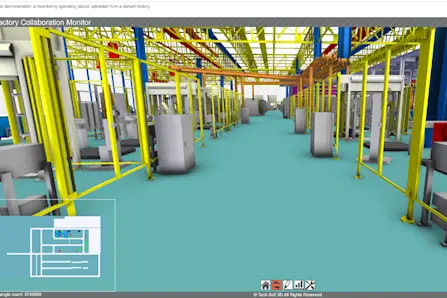
This demo showcases how HOOPS Visualize for Web is used to animate large AEC models. Within this demo, there are several robotic arms that are being animated from data stored on a remote server.
Users can synchronise views so that the screens are mirrored across all devices connected to this demo. Any markups added to the scene are also mirrored across any connected devices. When navigating through the demo, you will see animated robots operating. Clicking on or hovering over these robots will display each robot’s operating status.
How to Operate
To operate this demo, simply click and drag to walk through the model. The demo comes with some predefined operator buttons at the bottom of the page:
The first button will take you back to the default view
The second button allows you to toggle view synchronization on and off
The third button allows you to toggle markup on and off
The fourth button will show you factory statistics
The fifth button allows you to toggle ambient occlusion on and off.
How It Was Implemented
Explore HOOPS Visualise for Web
This demo was created using HOOPS Visualize for Web (formerly HOOPS Communicator).
Reference the HOOPS Visualize for Web (formerly HOOPS Communicator) Documentation.
Sign up for a free evaluation.
Jump straight into coding with the 3D Sandbox
Join our Community Forum
Questions or Feedback?
We are looking for feedback and how this toolkit can be improved to meet your needs! Please connect in our forum.
You can also sign-up for a 60-day trial of the HOOPS Web Platform.

Need to contact us? Email us at labs@techsoft3d.com.