
3D PDF指南
在 SpinFire Convert 系列中有几个工具,然而,这篇文章专注于3D PDF。当然,您知道什么是PDF文件,对吗?它是已从类似于Microsoft Word或PowerPoint之类的东西转换过来的文件,以便作者可以共享其内容;对吧?呃不,其实;它远不止于此。
便携文档格式(PDF)是由Adobe在1990年代开发的一种文件格式,用于展示文档,包括文本格式化和图像,以一种不依赖于应用软件、硬件和操作系统的方式。每个PDF文件都封装了一个固定布局平面文档的完整描述,包括显示所需的文本、字体、矢量图形、栅格图像和其他信息。PDF在2008年被标准化为开放格式,即ISO 32000。
如今,PDF文件除了平面文字和图形之外,还可能包含各种内容,包括逻辑结构元素、互动元素(如注释和表单字段)、层次、丰富媒体(包括视频内容)和三维对象。PDF规范还规定了加密和数字签名、文件附件和元数据,以支持需要这些功能的工作流程。无论如何,就本文件而言,我们最感兴趣的是三维对象元素。
如果您不了解3D PDF,那么您可能会以为3D内容是一个静态图像,或者可能是一个可以旋转的对象,就像一个GIF。事实上,3D PDF的现实和力量确实非同寻常。
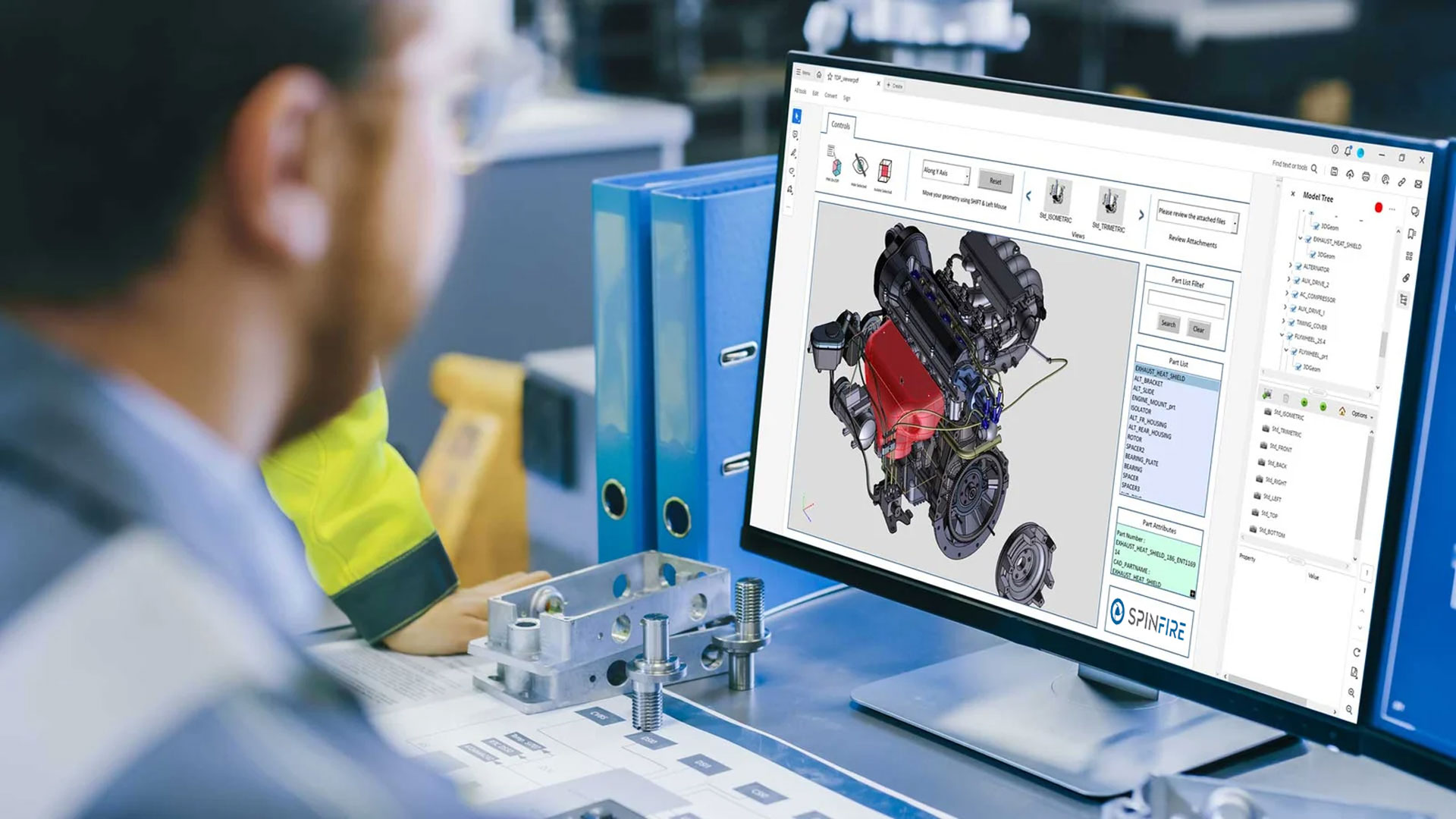
为了充分欣赏这一点,我建议您尝试一个。这里有一个3D PDF文件样例。最好的描述是,现在您所看到的这是CAD在一个文档里面;几乎就像PDF文档是一个包装,里面隐藏着一个更强大的产品!

SpinFire Convert为谁设计?
随着利用3D PDF进行智能文档和信息交换的新纪元的到来,SpinFire Convert是一项使任何需要参与该过程的人能够阅读、查看和标记3D数据,以加速开发过程从而利用CAD和PLM数据资产的工具。这使组织内部和供应链的人员能够查看、查询和贡献于创作过程,同时重要的是,在竞争日益激烈的市场中获得战略优势。
SpinFire Convert使得使用CATIA V5、CATIA 3DEXPERIENCE、Creo或NX进行设计的组织或希望通过PDF世界中的3D模型进行协作的组织能够实现。如果向合作伙伴合作,使用PDF可提高安全性。PDF通过为文档提供密码保护来保护数据,保护您的知识产权。SpinFire Convert确保在企业外部,您的数据是安全的。
SpinFire Convert具有可扩展性,它提供从简单的另存为工具到完整的企业级高容量发布解决方案,使协作团队能够快速轻松地创建包含直接从原生CAD或PLM发布的互动3D数据的文档。
SpinFire Convert如何带来好处?
这项技术的美妙之处在于部署的简单性和易于使用,消除了将部门、客户和供应商集成到产品生命周期过程中的障碍。
想象一下,整个组织和供应链中的每个人都能查看、查询并参与到创作过程中的情景。
通过采用这项新技术获得战略优势的机会,不容低估,从而利用您的CAD和PLM资产。
为什么使用互动3D PDF?
包含互动3D数据的3D PDF文件可以通过用户和没有原生CAD数据访问的部门使用免费提供的Adobe Acrobat Reader进行共享、查看和查询,但需要3D表示而无需额外的安装应用程序及其工作方式的知识。发布后,使用Adobe Acrobat Reader,用户将能够:
查看3D模型
查询模型树子装配
在装配中打开或关闭组件
用于技术撰稿的遮罩和渲染
查看为实体和线框
剖切组件和装配
3D PDF文档极为轻便,因此可以轻松电子邮件发送,而无需担心被防火墙或收件箱容量阻止。知识产权也可以在PDF中进行交换,保护原生数据。这是一种更聪明的方式交换您的设计数据。SpinFire Convert可以在一个过程中为不同部门配置多种不同上下文中的CAD模型分发,例如:
用于营销的实体装配(渲染)
技术出版物的隐藏线移除
客户服务用的爆炸视图
采购用的材料清单的一部分
只需按下一个按钮(或作为夜间批处理的一部分),SpinFire Convert将运行该过程并为多个用户创建多个文档。它还可以将数据交换文档通过电子邮件发送,或者可以上传到FTP站点或云上。
除了3D模型本身,还有许多用户可配置的功能,可应用于各种使用场景。
文档
因此,我们已经确定SpinFire Convert能够将3D CAD和可视化数据直接从设计应用程序中发布到互动3D PDF文档中。发布的文档输出包含原生CAD数据的嵌入式互动3D表示(预定义模板中)。
这些文档可以加注释,附加丰富的媒体,如PowerPoint文件、视频、在线信息的超链接和电子表格数据,可以自动嵌入或手动插入。PDF还可以像.zip文件一样传输附加文件,例如原生CAD数据、采购文档或统计过程控制文档。
使用SpinFire Convert让您能够创建一系列互动文档,包括:
工作指令
采购部门的报价请求
技术数据表
技术数据包 – 存档
技术出版物
工作指令
采用复杂但全面的方法使用PDF格式,使制造在单个文档中实现互动、逐步构建能力。
工作说明文档中最简单的形式可以包含:
一个分步流程,每个步骤引用其独特的数据集和视图
展示经过过滤的几何图形的互动表示的3D截面
附带图标,帮助减少语言是指需要突出特定要求(如危险区域)时的歧义。
展示与3D表示一起的信息手段
每个过程步骤的说明。
基于地理位置来适应观众的多语言内容
过程阶段可包含根据用户权限或所需操作的过滤步骤。
附加文档可补充语境和明晰已定义的操作状态;每个步骤可包含其自己的附加数据集。
工作说明模板环境将3D PDF格式的功能提升到一个新的水平,用于共享和消费数据。
采购部门的报价请求
采购部门使用3D PDF可以向供应商展示清晰可见的产品、组件、子装配和规格的互动3D表示;消除采购过程中的歧义。完全互动的三维和二维仰视图使采购部门能够轻松创建和共享RFQ文档,其中包含直接从PLM系统中持有的原生CAD数据发布的预填表单和互动3D数据。
RFQ最简单的形式可能包含:
成本信息
材料信息
技术规格
简要说明和注意事项
互动3D几何图形
技术数据表
使用3D PDF格式表示技术数据表正在改变数据的收集、显示和互动的方式。在创建过程中,通过在3D PDF文档模板中结合技术数据表的传统特征,输出和用途大大提高。
技术数据表传统上总结了产品、机器、组件、材料等的性能和其他技术特征,足够详细以使设计工程师例如能够理解'组件'在产品整体设计中的作用。它们通常具有非常正式但静态的2D布局,这些布局是手动从不同来源拼凑而来的。
现在可以发布一份包含来自多个来源的数据组合的单一文档,以及一个3D组件的互动表示,为技术细节和配置规格带来新的清晰度。
对一个组件进行高亮显示并能够立即看到它在产品总装中的位置、成本、材料等,这为传统技术数据表带来了一个新的维度。
技术数据包 – 存档
能够向标准PDF文件附加文件立即改变了它在企业内的使用方式。突然之间,曾经是文档的东西,可以被归类为一个内容丰富的、可用于存档的技术数据包。
您可以附加JPEG图片、电子表格和图纸、影片,甚至是原生CAD和可视化文件!附件可以直接从PDF中启动,帮助提供语境和明晰,并使用Adobe的内置压缩引擎,‘包’仍然是便携式格式,仍然可以轻松通过电子邮件发送,不像ZIP和RAR类型的包,由于潜在的安全风险,可能会被组织阻拦。
随着密码保护和数字权限管理(DRM)增加的安全性,3D PDF是一种非常丰富且易于沟通和消费数据的方式,可以在任何供应链中上下游传播数据,并在单个安全文档中存档完整的项目和设计数据。
技术出版物
质量和检查部门的检查报告
使用PDF格式创建包含互动3D数据的最终检查文档,大大提升和简化了组件需要通过质量控制进而投入生产的QA报告功能。
结合额外元数据的特定零件或组件的互动3D表示 - 零件描述、零件编号、详细图纸和拟议变更 - 并作为检查过程的一部分创建,可以加上注释,突出显示发现的结果并在部门之间共享,确实是一种非常强大的信息沟通工具。
3D表示可以用作检查的额外检查;直观地显示已检查或需要检查的内容。
使用可以直接从源数据中填充值的QA报告模板;可以从组织内所有必要的部门提取数据,并附加以创建数据包,减少查找所有必需文档和图纸所需的时间,帮助改进QA过程。
工程部门的工程变更请求
3D PDF是用于工程变更请求文件的理想机制。可以使用互动3D PDF通知和更新工程部门内部的人员关于需要对组件进行修改,无需专门的CAD或查看应用程序即可看到更改,并给予相关审批。
与检查报告一样,添加特定零件或组件的互动3D表示,结合额外元数据、拟议变更,并作为ECR过程的一部分创建,可以加注解、加上笔记突出显示,然后共享,是一种非常强大但简单的沟通工具。
由于PDF不需要使用Vis-Mockup的许可来将CAD数据加载到特定应用程序中,例如,将节省时间并减少成本,特别是当所有必要的信息都可以包含并附加在一个文档中(技术数据包)时;简化了签署过程。
制造部门的材料清单(BOM)
当产品生命周期处于生产阶段时,确保员工拥有所有必要的信息以便建立生产所需的工艺流程是至关重要的。
大部分信息将由设计工程师传递下去,他们将使用CAD系统设计产品。但制造工程师需要的不仅仅是设计视觉,他们还需要产品信息的其余部分,如尺寸和材料等。除非他们知道如何使用CAD系统,否则他们可能会难以访问和理解。以本地数字形式共享数据需要专业资源和培训。更为传统的纸质途径同样会产生问题。这两种途径都可能昂贵且耗时,而且通常需要工程人员的投入才能理解数据。
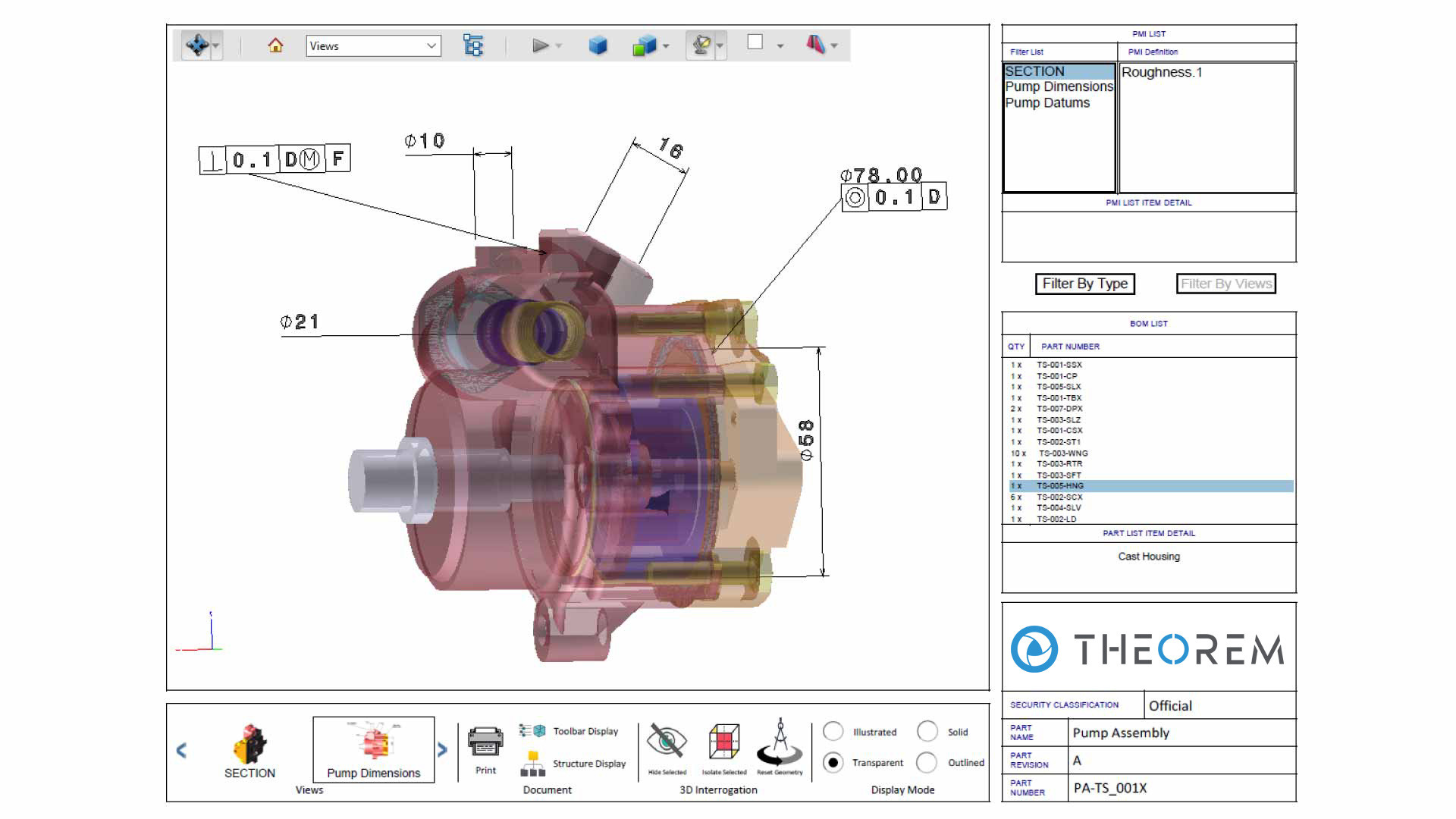
结合互动3D设计数据表示和完整的产品制造信息(PMI),3D PDF文档可以在制造过程中使用,取消从CAD源数据输出2D图纸的要求。
3D PDF允许更深入地理解产品,因为可以查看不同的视图进行查询,以及维度、公差和表面光洁度信息。可以将附加信息附加到3D PDF文档中(例如电子表格、超链接、AVI等)。然后可以使用嵌入的3D图像和任何附加数据,如数量和成本信息,以及原材料清单,创建可在整个组织和供应链中共享的MBOM。
协作
SpinFire Convert使得使用CATIA V5、CATIA 3DEXPERIENCE、Creo或NX进行设计的组织或希望延伸JT数据用途的组织能够无缝地将3D数据发布为PDF,并将3D模型中的智能内容带入PDF世界。这意味着任何人都可以通过Adobe的通用阅读器消费、查看和标记3D数据。从而消除了需要安装专业查看软件或需要培训使用特殊工具的需求。
PDF促进了内部和外部的协作过程,帮助加快开发进程并更快将产品推向市场。3D消除歧义,并使之成为简单的文件可以携带3D数据,而这些数据能够由过程中的每个人查看和查询,而不仅仅是工程专家。这使SpinFire Convert只需执行简单的“另存为”,便将复杂的CAD放入PDF文档中。对于需要每天发布数百或数千份文档的用户,易于使用和自动化的发布过程是解决方案的一部分。
如果与合作伙伴合作,使用PDF可提高安全性。PDF通过为文档提供密码保护来保护数据,保护您的知识产权。SpinFire Convert确保在企业外部,您的数据是安全的。
SpinFire Convert具有可扩展性,它提供从简单的另存为工具到完整的企业级高容量发布解决方案,使协作团队能够快速轻松地创建包含直接从原生CAD或PLM发布的互动3D数据的文档。
改善的协作将导致数据的无缝交换,更重要的是来自设计工程师的设计意图。此数据可以在供应链上下游进行分析并优化,以改进装配、产品成本、采购、质量、工具制造、工作说明和营销。这无疑将导致缩短交货时间、减少错误和提高产品质量。
新SpinFire Convert技术的一个非常聪明的功能是能够在同一文档中嵌入或打包原生CAD文件,发布一份PDF文档,其中包含每件协作所需的信息。
数据审查
几乎每个组织内的部门在加工过程中某个时候都需要讨论产品设计;问题是如何更高效地做到这一点,并利用现有资源?
产品设计师与组织内的许多不同部门有着密切的工作关系。他们创建最初的设计概念/简报,然后需要与同事共享以审查和评估设计,并提供他们自己的意见和反馈。使用3D PDF可快速方便地实现这一点,从而加速整个设计周期。
通过在免费提供的Adobe Reader中嵌入3D查看功能,3D数据交换和3D查看成为全球任何人都可以使用的功能。
使用3D PDF审查数据提供以下功能:
注释:允许在数据上添加额外评论,并在需要时保存更改源数据。
保存视图:保存查看会话的各种版本
切割:创建模型的剖面视图
爆炸:通过分解装配来检查CAD数据的细节
隐藏/显示零件:只看必要的部分
开箱即用的标准命令 - 熟悉常规PDF用户
附件:电子表格、AVI和超链接的添加等创造了一个丰富的数据包
数据审查今天可以使用最新的数字3D技术进行协作,使多个概念可以被全球的各个部门审查,以评估不同的配置,然后再为新设计或现有配置的变更确定最终选项。
数据交换
CAD数据交换通常与项目相关,并且在项目的早期探索阶段,它可能仅在OEM和顶级供应商之间进行,且仅限于少数人之间传递,因为可行性和成本仍在考虑之中。
不仅协作团队的不同成员之间交换的CAD数据数量、时间和速度有所不同,它的性质也有所不同。例如,在RFQ(报价请求)阶段,OEM可能会发送原生CAD数据、大型STEP或JT装配给多个关键的一级供应商,以使这些公司中的工程师能够理解需求并开发他们的回应。这个数据可能伴随着大量的支持性文本文件,这些文件用于描述项目的销售、采购、工程和法律部门,以便接收到RFQ的公司了解项目。
所有这些数据都可以作为一个单一的PDF发送。这样,所有相关的文档、PMI、元数据信息等都可以在一个文档中一起传输。此外,由于PDF与CAD无关,它甚至不需要CAD许可证,只需免费的Adobe Reader - 任何人都可以阅读。这对于那些接收公司中可能只使用低成本CAD应用程序的小型或专业制造公司特别有用。
基于模型的定义
模型定义(MBD)是一种使用3D模型模拟(如实体模型、3D PMI和相关的元数据)在3D CAD软件中定义制造单个组件和产品装配所需的数据的做法。 包括的信息类型有几何尺寸和公差(GD&T)、组件级材料、装配级材料清单、工程配置、设计意图等。相比之下,其他方法在历史上一直需要基于2D工程图纸来提供这样的细节。
现代3D CAD应用程序允许在3D数字数据集中插入工程信息,如尺寸、GD&T、说明和其他产品细节。 MBD利用此类能力建立3D数字数据集,作为产品这些规格的来源和设计权威。 3D数字数据集可能包含足够的信息来制造和检查产品,而无需工程图纸(传统上包含此类信息)。
在许多情况下,使用来自3D数字数据集的一些信息允许通过各种过程快速制作产品原型,例如3D打印。 制造商可能能够直接将3D数字数据提供给CNC机器等制造装置以制造最终产品。
在产品生命周期的开始实施MBD并在整个组织及其供应链中重复使用它,能够快速、无缝和具有成本效益地开发和部署产品。
PMI
产品制程信息(PMI)传达3D计算机辅助设计(CAD)和协同产品开发系统中必要的非几何属性,用于制造产品组件和装配。
PMI可能包括几何尺寸和公差、3D注释(文本)和尺寸、表面光洁度和材料规格。 PMI与3D模型中的模型定义配合使用,以便在数据集利用中消除2D图纸。
SpinFire Convert为从单一数据源发布多个PDF提供了机会。 我们的UI通过允许工程数据进行过滤、查看、查询、操作和翻译(无论是交互的还是批量的),并具有发布用户特定文档的能力,帮助开发和简化翻译流程和下游流程。
安全性
包含互动3D数据的PDF文件提供比原生CAD文件更高的知识产权(IP)安全级别,因为文档可以受密码保护。
原生CAD文件不能设定密码保护,从而在共享或访问时造成IP漏洞。 使用3D PDF,CAD数据可以被转换为镶嵌格式,内容如特征、历史和约束被移除,以便3D表示可以查看和操作,但原生CAD数据不能仅从PDF访问或再现。
这个附加功能使在与合作伙伴和供应商共享敏感信息时更有信心。
使用标准的Adobe PDF安全性,3D PDF可以是:
密码保护
加密
添加数据权限管理
对特定用户的访问权限限制,与其它应用程序如LiveCycle、FileOpen等一起应用。
3D PDF有能力使文档可以加上注释,并且还可以作为传输其他数据的‘载体’文件(如电子表格、AVI影片、超链接以及原生CAD数据),并创造更丰富的文件和信息源,但仍然保持IP安全。
总结
3D PDF格式正在改变数据的消费和共享方式。 它是一个简单且具有成本效益的方法,能够与内部和外部的非CAD用户一起利用现有的CAD和PLM资产。 更重要的是,互动格式的使用正在帮助减少歧义和提高沟通效果,同时加快并简化日常工程和制造设计周期过程。这反过来又在帮助降低成本,加快上市时间并提高产品质量。
3D PDF使所有规模的组织能够将其原生3D CAD和可视化数据扩展到许多跨学科应用领域,并通过使用3D几何、产品结构和相关元数据的访问进行下游重用。
能够利用单一文档作为互动技术数据包而不丧失质量,使通常没有原始工程和CAD设计数据访问权的员工更全面地理解产品的3D技术内容。
通过使用密码保护和数字权利管理,知识产权在3D PDF格式中保持安全,数据仍然可以安全地进行交换而无需担心或风险。
3D PDF格式是整个产品生命周期中工程设计数据共享和消费的未来。
Once published, using Adobe Acrobat Reader a user will be able to:
View the 3D model
Interrogate the model tree sub-assemblies
Turn components in assemblies on and off
Shade and render for technical authoring
View as a solid and wireframe
Cross section components and assemblies
A 3D PDF document is extremely lightweight and therefore easily emailed without the danger of it being blocked by a firewall or inbox capacity. Intellectual Property can also be exchanged in a PDF protecting the native data. A smarter way of exchanging your design data. SpinFire Convert can be configured to distribute CAD models in many different contexts for different departments (all in one process), for example:
As a solid assembly (rendered) for marketing
Hidden line removed for technical publication
An exploded view for customer service
Part of a bill of materials for purchasing
SpinFire Convert will run the process at the press of a button (or as part of an overnight batch process) and will create multiple documents for multiple users. It can also email the data exchange document or can upload it to an FTP site or the cloud.
In addition to the 3D model itself, there are many user-configurable features that lend themselves to an array of use cases.
Documentation
So, we have been able to ascertain that SpinFire Convert enables the publishing of 3D CAD and visualization data directly from within design applications into interactive 3D PDF documents. The published document output contains embedded interactive 3D representations of the native CAD data (within a pre-defined template).
These documents can be annotated and additional rich media such as PowerPoint files, video, hyperlinks to additional online information, and spreadsheet data can be auto-embedded or inserted manually. The PDF can also act like a .zip file to transport additional files, for example, native CAD data, purchasing documentation or statistical process control documentation.
Using SpinFire Convert enables you to create a range of interactive documentation including:
Works Instruction
Request for Quotation for Purchasing Departments
Technical Data Sheet
Technical Data Package – Archiving
Technical publications
Works Instruction
A complex, yet comprehensive approach to using the PDF format enabling interactive, step by step building capabilities for manufacturing in a single document.
The Works Instruction document in its simplest form can contain:
A stepped process, each step referencing its own unique data set and view
A 3D section showing an interactive representation of filtered geometry
Accompanying icons which help to reduce ambiguity where the language is an issue when needing to highlight specific requirements – i.e. hazardous area.
A means to show information alongside the 3D representation
The instructions for each process step.
Multi-lingual content to suit the audience based on geographical location
Process stages can contain filtered steps, based upon user permissions or required actions.
Additional Documentation can be attached to give context and clarity for defined operation states; each step can contain its own attached data set.
The Works Instruction template environment takes the capabilities of the 3D PDF format to the next level for sharing and consuming data.
Request for Quotation for Purchasing Departments
3D PDF for Purchasing departments offers the ability to present suppliers with crystal clear interactive 3D representations of products, components, sub-assemblies and specifications; removing ambiguity from the procurement process. The fully interactive three dimensional and two-dimensional elevation views empower purchasing departments to easily create and share RFQ documents, containing pre-populated forms and interactive 3D data published directly from native CAD data held on PLM systems.
An RFQ in its simplest form can contain:
Costing information
Material Information
Technical specifications
Briefing notes and care points
Interactive 3D geometry
Technical Data Sheet
Using the 3D PDF format to represent a Technical data sheet is revolutionizing how easily data can be gathered, displayed and interacted with. By incorporating the traditional characteristics of a technical data sheet within a 3D PDF document template as part of the creation process, the output and uses are dramatically enhanced.
A Technical Data Sheet traditionally summarizes the performance and other technical characteristics of a product, machine, component, material, etc. in sufficient detail that allows design engineers, for example, to understand the role of the ‘component’ within the overall design of the product. They generally have a very formal, yet static 2D layout which has been pulled together manually from disparate sources.
It is now possible to publish a single document containing a combination of data from a variety of sources, alongside an interactive representation of a 3D component, which is bringing new clarity to the technical detail and configuration specifications.
Highlighting a component and being able to instantly see where it fits into the overall product assembly, costings, materials, etc. is bringing a new dimension to the traditional technical data sheet.
Technical Data Package – Archiving
Being able to attach files to a standard PDF file immediately changes how it can be utilized within a business. Suddenly, what was a document, can be classed as a rich in content, technical data package that can be used for archiving.
You can attach Jpegs, Spreadsheets, and Drawings, Movies or even native CAD and Visualization files! Attachments can be launched directly from within the PDF helping to give context and clarity, and using Adobe’s built-in compression engine, the ‘package’ remains a portable format that is still easily emailed, unlike ZIP and RAR type packages that can get be blocked by an organization due to potential security risks.
With the addition of password protection and digital rights management (DRM) for added security, 3D PDF is a very rich and easy way to communicate and consume data up and down any supply chain as well as archive complete project and design data in a single secure document.
Technical Publications
Inspection Reports for Quality and Inspection Departments
The creation of final Inspection documentation, containing interactive 3D Data using the PDF format, significantly enhances and simplifies the QA reporting function needed for components to pass quality control and move into production.
An interactive 3D representation of a specific part or component, combined with additional metadata-part descriptions, part numbers, detailed drawings and proposed changes- and created as part of the inspection process that can be annotated, with findings highlighted and shared between departments is a very powerful information communication tool indeed.
The 3D representation can be used as an additional check of inspection; visually showing what has been inspected or what needs to be inspected.
Using a QA report template that can be populated directly from source data; with data that can be pulled from all necessary departments within an organization, as well as being attached to create a data package, reduces the time needed to locate all required documents and drawings helping to improve the QA process.
Engineering Change Request for Engineering Departments
3D PDF is the perfect mechanism to use for an Engineering Change Request Document. An interactive 3D PDF can be used to inform and update others within the Engineering department that modifications to a component are required, without needing specialist CAD or viewing applications to see the change(s) and give relevant approvals.
As with the Inspection Reports, the addition of an interactive 3D representation of a specific part or component, combined with additional metadata, proposed changes, and created as part of the ECR process that can be annotated, with notes highlighted and then shared, is a very powerful, yet simple communication tool.
As PDF doesn’t require the use of a license of Vis-Mockup to load CAD data into a specific application, for example, time will be saved and costs reduced, especially as the all necessary information can be contained and attached within a single document (technical data package); simplifying the sign off process.
Bill of Materials (BOM) for Manufacturing Departments
When the product lifecycle is at the manufacturing stages, it is essential that staff have all the necessary pieces of information that are required to put in place the manufacturing processes needed for production.
Most of this information will be passed down from the design engineers, who will have designed the product using a CAD system. But the manufacturing engineers need more than just the design visual, they need the rest of the product information, such as dimensions and materials etc. and unless they know how to use a CAD system, they may have difficulty in accessing and understanding it. Sharing data in its native digital form requires specialist resource and training. The more traditional paper route can equally be as problematic. Both routes can be expensive and time-consuming and often require input from Engineering to make sense of the data.
Combining interactive 3D design data representations with full Product Manufacturing Information (PMI), 3D PDF documents can be used during the manufacturing process, removing the requirement for 2D drawings to be output from the CAD source data.
3D PDF allows a more thorough understanding of the product due to different views being available for interrogation, along with dimensional, tolerance, and surface finish information. Additional information can be attached to the 3D PDF document (such as spreadsheets, hyperlinks, AVI’s etc.). You can then use the 3D image embedded and any additional data, such as quantities, and cost information, and lists of raw materials, to create an MBOM, which can be shared throughout the organization and the supply chain.
Collaborate
SpinFire Convert enables organizations who design with CATIA V5, CATIA 3DEXPERIENCE Creo or NX, or who want to extend the use of their JT data to seamlessly publish that 3D data as a PDF, and take the intelligence contained within a 3D model into the world of PDF. That means anybody can consume, view and mark-up 3D data with Adobe’s ubiquitous Reader. It eliminates the need to install specialist viewing software or to be trained to use a special tool.
PDF facilitates the collaboration process internally and externally, helping speed up the development process and getting products to market faster. 3D eliminates ambiguity and enables simple documents to carry 3D data which can be viewed and interrogated by everybody in the process, not just engineering specialists. With SpinFire Convert just doing a simple “save as”, this puts complex CAD into a PDF document. For users who need to publish 100’s or 1000’s of documents a day, a simple-to-use and automated publishing process is part of the solution.
Using PDF improves security when collaborating with business partners. PDF secures the data by providing password protection to the document, protecting your intellectual property. SpinFire Convert makes sure that outside of the enterprise your data is secure.
SpinFire Convert is scalable, it provides a simple save as tool, up to a full enterprise high volume publishing solution enabling collaborative teams to quickly and easily create documentation containing interactive 3D data published directly from native CAD or PLM.
Improved collaboration will result in seamless exchanges of data and more importantly, design intent from the design engineer. This data can be analyzed up and down the supply chain and optimized for improvements to assembly, product cost, purchasing, quality, tool making, work instructions and marketing. This will undoubtedly lead to reduced lead-times, fewer mistakes and better products.
One exceptionally smart function of the new SpinFire Convert technology is the ability to embed or package native CAD files in the same document, publishing one PDF document with every piece of collaborative information required.
Data Review
Almost every department within an organization will need to discuss a product’s design at some point along the process; the question is how this can be done more efficiently and utilizing existing resource?
Product designers have a close working relationship with many different departments within an organization. They create the initial design concept/brief which would then need to be shared with colleagues to review and assess the design and provide their own input and feedback. Using 3D PDF makes this quick and easy and so speeds up the whole design cycle.
By embedding 3D viewing capability into the freely available Adobe Reader, 3D data exchange and 3D viewing become available to anyone in the world.
Using 3D PDF to review data offers the following functionalities:
Annotations: allows additional comments to be added to the data if required and saves changing the source data.
Saved views: save various iterations of a viewing session
Sectioning: create a cross-section of the model
Explode: examine the finer detail of the CAD data by breaking the assembly down
Hide/show parts: only see what is necessary
Standard out of the box commands- familiar to regular PDF users
Attachments: the addition of spreadsheets, AVI’s and hyperlinks etc. create a rich data package
Data reviews today can be conducted collaboratively using the latest digital 3D technologies, enabling multiple concepts to be reviewed by departments globally, to evaluate different configurations before settling on final options for new designs, or changes to existing configurations.
Data Exchange
CAD Data Exchange is often project related, and at the early exploratory stages of a project it may only take place between OEM and top Tier suppliers, and only passed between a limited set of people as feasibility and costs are considered.
Not only do the timing, volume and rate of CAD data being exchanged vary between different members of the collaboration team, it varies in its nature. For example, at RFQ (request for quotation) stage an OEM may send native CAD data, a large STEP or JT assembly to a number of key Tier 1 suppliers to enable the engineers in those companies to understand the requirement and to develop their response. This data may be accompanied by a significant number of supporting text documents that describe the project for sales, purchasing, engineering and legal departments in the companies that receive the RFQ.
All of this data could be sent as a single PDF. This way all of the related documentation, PMI, metadata etc. can all travel in a single document. In addition to this, as the PDF is CAD agnostic, it doesn’t even need a CAD license, just the free Adobe Reader- anyone can read it. This is particularly useful if one of the receiving companies is a very small or niche manufacturing company that may only be using basic low-cost CAD applications.
Model-Based Definition
Model-based definition (MBD) is the practice of using 3D models (such as solid models, 3D PMI and associated metadata) within 3D CAD software to define the manufacturing data that is needed to make individual components and product assemblies. The types of information included are Geometric Dimensioning and Tolerancing (GD&T), component level materials, assembly level bills of materials, engineering configurations, design intent, etc. By contrast, other methodologies have historically required accompanying use of 2D engineering drawings to provide such details.
Modern 3D CAD applications allow for the insertion of engineering information such as dimensions, GD&T, notes and other product details within the 3D digital data set for components and assemblies. MBD uses such capabilities to establish the 3D digital data set as the source of these specifications and design authority for the product. The 3D digital data set may contain enough information to manufacture and inspect product without the need for engineering drawings (which have traditionally contained such information).
In many instances, use of some information from 3D digital data set allows for rapid prototyping of product via various processes, such as 3D printing. A manufacturer may be able to feed 3D digital data directly to manufacturing devices such as CNC machines to manufacture final products.
Implementing MBD at the beginning of the product lifecycle and re-using it throughout an organization and its supply chain enables quick, seamless and cost-effective development and deployment of products.
PMI
Product manufacturing information (PMI) conveys non-geometric attributes in 3D computer-aided design (CAD) and Collaborative Product Development systems necessary for manufacturing product components and assemblies.
PMI may include geometric dimensions and tolerances, 3D annotation (text) and dimensions, surface finish, and material specifications. PMI is used in conjunction with the 3D model within a model-based definition to allow for the elimination of 2D drawings for data set utilization.
SpinFire Convert provides the opportunity for multiple PDF publishing from a single data source. Our UI helps the development and streamlining of translation and downstream processes by allowing engineering data to be filtered, viewed, interrogated, manipulated and translated interactively or in batches with the ability to publish user-specific documentation.
Security
PDF files containing interactive 3D data provide a higher level of Intellectually Property (IP) security than native CAD files by allowing the documents to be password protected.
Native CAD files cannot be password protected, causing IP vulnerabilities when shared or accessed. Using 3D PDF, the CAD data can be translated into a tessellated format, with content such as features, history and constraints being removed, so that the 3D representation can be viewed and manipulated, but the native CAD data cannot be accessed or reproduced from the PDF alone.
This added functionality gives greater confidence when sharing sensitive information with partners and suppliers.
Using standard Adobe PDF security, a 3D PDF can be:
Password protected
Encrypted
Data Rights Management added
Restricted access for specific users with other applications such as LiveCycle, FileOpen etc.
A 3D PDF has the capability for the document to be annotated, and can also act as a ‘carrier’ file for additional data to be transported (such as spreadsheets, AVI Movies, hyperlinks, as well as native CAD data) and create a richer file and source of information, but still keep IP secure.
Summary
The 3D PDF format is revolutionizing the consumption and sharing of data. It is a simple and cost-effective method to leverage existing CAD and PLM assets with non-CAD users internally and externally. More importantly, the use of the interactive format is helping to reduce ambiguity and improve communication, whilst speeding up and simplifying day to day engineering and manufacturing design cycle processes. This, in turn, is helping to reduce costs, time to market and improving product quality.
3D PDF is enabling organizations of all sizes to extend the use of their native 3D CAD and Visualization data into numerous multi-disciplinary application areas and for downstream re-use that can benefit from access to 3D geometry, product structure and associated metadata.
Being able to utilize a single document as an interactive technical data package without loss of quality, is allowing a more thorough understanding of the 3D technical content of the product by staff who would not normally have access to raw engineering and CAD design data.
With Intellectual Property remaining secure in the 3D PDF format using password protection and digital rights management, data can still be exchanged without concern or risk to security.
The 3D PDF format is the future of data sharing and consumption of engineering design data throughout a product lifecycle.