
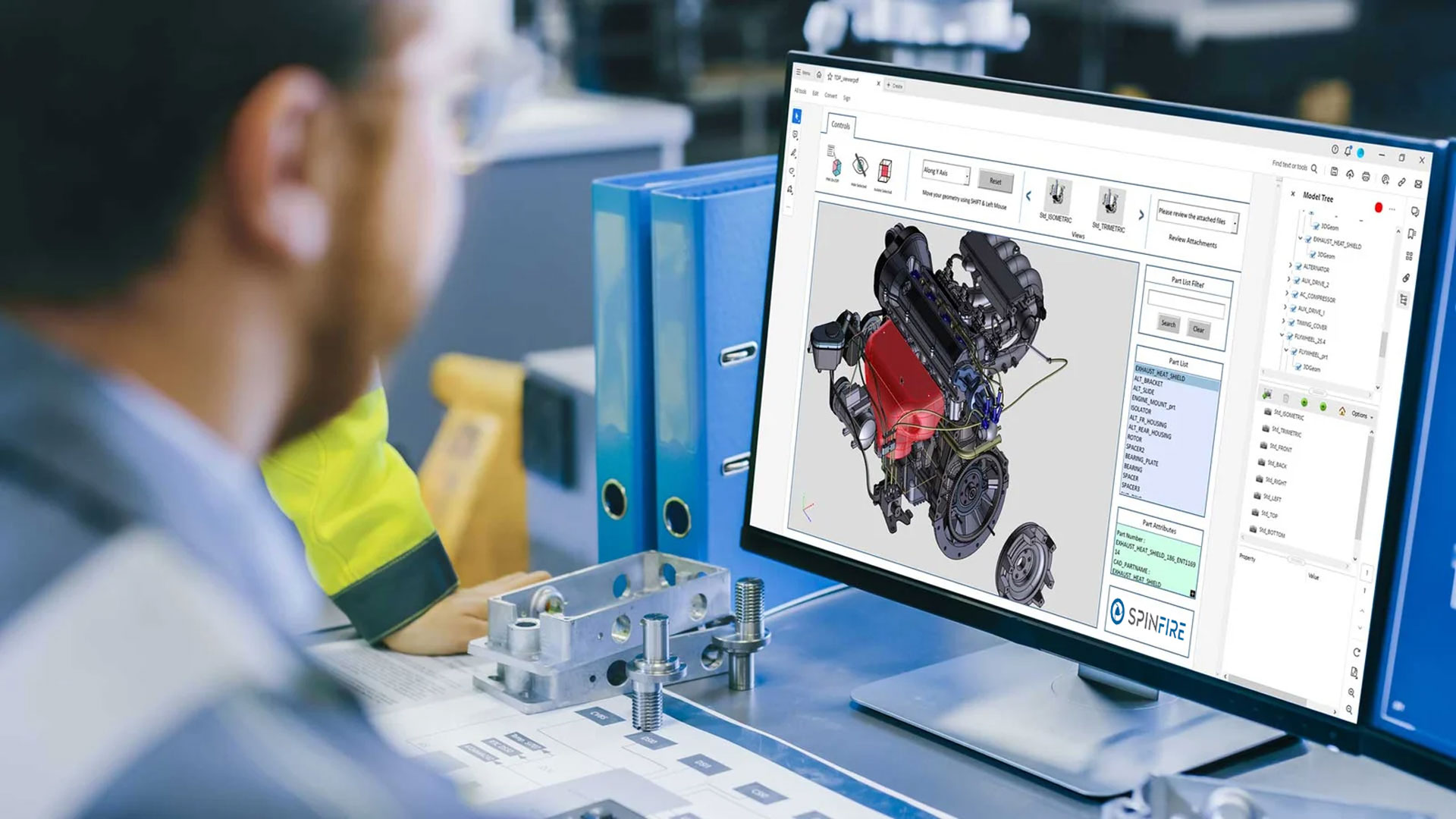
3D PDF 가이드
에는 몇 가지 도구가 포함되어 있습니다. SpinFire Convert 패밀리, 그러나 이 포스트는 3D PDF에 초점을 맞추고 있습니다. 물론, PDF 파일이 무엇인지 아시죠? 그것은 Microsoft Word나 PowerPoint 같은 프로그램에서 변환된 문서로, 작성자가 그 내용을 공유할 수 있도록 합니다. 이것뿐인가요? 사실 그렇지 않습니다; 훨씬 더 많은 것을 가지고 있습니다.
Portable Document Format (PDF)는 1990년대 Adobe에 의해 개발된 파일 형식으로, 응용 소프트웨어, 하드웨어 및 운영 체제와 독립적으로 문서, 텍스트 서식 및 이미지를 제공하기 위해 만들어졌습니다. 각 PDF 파일은 고정된 레이아웃의 평면 문서에 대한 완전한 설명을 캡슐화하여 텍스트, 글꼴, 벡터 그래픽, 래스터 이미지 및 그것을 표시하는 데 필요한 기타 정보를 포함합니다. PDF는 2008년 개방형 형식인 ISO 32000으로 표준화되었습니다.
오늘날 PDF 파일에는 평면 텍스트와 그래픽 외에도 논리적 구조 요소, 주석 및 양식 필드 같은 상호작용 요소, 레이어, 리치 미디어(동영상 콘텐츠 포함) 및 삼차원 객체와 같은 다양한 콘텐츠를 포함할 수 있습니다. PDF 사양은 암호화와 디지털 서명, 파일 첨부 및 메타데이터를 이러한 기능을 필요로 하는 워크플로우를 가능하게 하기 위해 제공합니다. 특히 이 문서의 목적상 가장 관심 있는 부분은 삼차원 객체 요소입니다.
만약 3D PDF에 대해 잘 모른다면, 3D 콘텐츠가 정적 이미지거나 GIF처럼 회전할 수 있는 객체일 거라고 생각할 수 있습니다. 사실, 3D PDF의 현실과 그 힘은 정말 놀랍습니다.
이를 완전히 이해하기 위해, 하나를 직접 시도해보는 것이 좋습니다. 여기에 샘플 3D PDF 파일이 있습니다. 이제 볼 수 있는 가장 좋은 방법은 이게 문서 안에 CAD라는 것입니다. 거의 PDF 문서가 더 강력한 제품을 숨기는 포장지 같습니다!

SpinFire Convert는 누구를 위해 설계되었나요?
새로운 3D PDF를 활용한 지능형 문서화 및 정보 교환 시대가 도래함에 따라, SpinFire Convert는 이 과정에 참여해야 할 모든 사람에게 읽고, 보고 주석을 달아 3D 데이터를 빠르게 개발하여 CAD 및 PLM 데이터 자산에 대한 투자를 활용할 수 있는 도구입니다. 이를 통해 조직 내부와 공급망 내의 사람들이 창의적 프로세스에 참여하여 기여할 수 있으며, 점점 경쟁력을 갖추는 시장에서 전략적 우위를 점할 수 있습니다.
SpinFire Convert는 CATIA V5, CATIA 3DEXPERIENCE, Creo 또는 NX로 설계하는 조직이나 PDF 세계에서 3D 모델 협업을 원하는 조직에 적합합니다. PDF를 사용하면 비즈니스 파트너와의 협업 시 보안이 향상됩니다. PDF는 문서에 비밀번호 보호를 제공하여 지적 재산을 보호합니다. SpinFire Convert는 기업 외의 데이터를 안전하게 보호합니다.
SpinFire Convert는 확장 가능하며, 단순한 '다른 이름으로 저장' 도구에서부터 완전한 기업 고도로 출판 솔루션까지 제공하여 협업 팀이 네이티브 CAD 또는 PLM에서 직접 상호작용 3D 데이터를 포함한 문서를 빠르고 쉽게 생성할 수 있습니다.
SpinFire Convert는 어떤 이점을 제공할 수 있을까요?
이 기술의 매력은 배포의 간편성과 사용 용이성으로, 부서, 고객 및 공급업체를 제품 수명주기 프로세스에 통합하는 데 장애물을 제거합니다.
조직과 공급망의 모든 사람들이 창의적 프로세스에 대해 볼 수 있고, 탐색하고 기여할 수 있는 시나리오를 상상해보세요.
이 새로운 기술을 채택하여 CAD 및 PLM 자산을 활용해 전략적 우위를 얻을 수 있는 기회를 과소평가해서는 안 됩니다.
왜 상호작용 3D PDF를 사용해야 하나요?
3D PDF 파일 내에 포함된 상호작용 3D 데이터는 네이티브 CAD 데이터에 접근하지 못하고 3D 표현이 필요하지만 추가적인 설치 애플리케이션이 불필요한 사용자 및 부서에서 무료 Adobe Acrobat Reader를 통해 공유, 조회 및 탐색될 수 있습니다. 한 번 게시된 후, Adobe Acrobat Reader를 사용하여 사용자는 다음을 할 수 있습니다:
3D 모델 보기
모델 트리 하위 조립품 탐색
조립품의 구성 요소 켜기 및 끄기
기술 작성을 위해 음영 처리 및 렌더링
실체 및 와이어 프레임으로 보기
구성 요소 및 조립품의 단면 보기
3D PDF 문서는 매우 경량이어서 방화벽이나 수신함 용량에 의해 차단될 위험 없이 쉽게 이메일로 전송할 수 있습니다. 네이티브 데이터를 보호하면서 지적 재산도 PDF로 교환할 수 있습니다. SpinFire Convert는 다양한 부서의 (하나의 프로세스에서 모두) 서로 다른 문맥에서 CAD 모델을 배포하도록 구성할 수 있습니다. 예를 들어:
마케팅을 위한 실체 조립품 (렌더링)
기술 출판을 위한 숨겨진 구배 제거
고객 서비스용 폭발도
구매를 위한 자재 목록의 일부
SpinFire Convert는 버튼을 누르면 (또는 야간 배치 프로세스의 일부로도) 프로세스를 실행하여 여러 사용자용으로 여러 문서를 생성합니다. 또한 데이터 교환 문서를 이메일로 보낼 수 있거나 FTP 사이트나 클라우드에 업로드 할 수 있습니다.
3D 모델 자체 외에도 다양한 용도에 적합한 사용자 구성 가능한 기능이 많이 있습니다.
문서화
따라서, 우리는 SpinFire Convert가 설계 응용 프로그램 내에서 직접 상호작용 3D PDF 문서로 3D CAD 및 시각화 데이터를 출판할 수 있도록 한다는 것을 확인할 수 있었습니다. 게시된 문서 출력물은 기본 CAD 데이터의 내장된 상호작용 3D 표현을 (사전 정의된 템플릿 내에) 포함합니다.
이 문서들은 주석을 붙일 수 있으며, PowerPoint 파일, 비디오, 추가 온라인 정보에 대한 하이퍼링크, 스프레드시트 데이터와 같은 추가 리치 미디어를 자동으로 포함하거나 수동으로 삽입할 수 있습니다. PDF는 또한 추가 파일을 전송하기 위한 .zip 파일처럼 작용하여 예를 들어 네이티브 CAD 데이터, 구매 문서 또는 통계적 프로세스 제어 문서를 운반할 수 있습니다.
SpinFire Convert를 사용하여 다음을 포함한 다양한 상호작용 문서를 작성할 수 있습니다:
작업 지시
구매 부서를 위한 견적 요청
기술 데이터 시트
아카이빙용 기술 데이터 패키지
기술 출판물
작업 지시
단일 문서에서 상호작용하고 단계별 제조 가능성을 구축하는 PDF 형식의 복잡하지만 포괄적인 접근 방식.
가장 간단한 형태의 작업 지시 문서에는 다음이 포함될 수 있습니다:
각 단계마다 고유한 데이터 세트 및 보기를 참조하는 단계별 프로세스
필터링된 기하학의 상호작용 표현을 보여주는 3D 섹션
특정 요구사항을 강조해야 할 때 언어가 문제일 경우 애매함을 줄이기 위해 도움을 주는 아이콘 동반 - 즉, 위험 구역.
3D 표현 옆에 정보를 보여주는 수단
각 프로세스 단계에 대한 지시사항.
지리적 위치에 기반한 관객에 맞춘 다국어 콘텐츠
프로세스 단계는 사용 권한이나 필요한 행동에 기초한 필터링된 단계를 포함할 수 있습니다.
정의된 작업 상태에 대한 맥락과 명확성을 제공하기 위해 추가 문서를 첨부할 수 있습니다; 각 단계는 자체 첨부 데이터 세트를 포함할 수 있습니다.
작업 지시 템플릿 환경은 데이터 공유 및 소비를 위해 3D PDF 형식의 기능을 다음 수준으로 끌어올립니다.
구매 부서를 위한 견적 요청
구매 부서를 위한 3D PDF는 제품, 구성 요소, 하위 조립품 및 사양의 선명한 상호작용 3D 표현을 공급업체에 제안할 수 있는 능력을 제공합니다; 조달 프로세스의 모호함을 제거합니다. 완전히 상호작용하는 삼차원 및 이차원 입면도 뷰를 통해 구매 부서는 쉽게 RFQ 문서를 작성하고 공유할 수 있도록 하며, PLM 시스템에 보관된 네이티브 CAD 데이터에서 직접 게시된 상호작용 3D 데이터를 포함합니다.
가장 간단한 형태의 RFQ에는 다음이 포함될 수 있습니다:
비용 정보
재료 정보
기술 사양
간단한 설명 및 주의 사항
상호작용 3D 기하학
기술 데이터 시트
3D PDF 형식을 사용하여 기술 데이터 시트를 표현하는 것은 데이터를 수집하고, 표시하고, 상호작용하는 방식을 혁신적으로 변화시킵니다. 3D PDF 문서 템플릿의 일부로 기술 데이터 시트의 전통적인 특성을 포함함으로써 생성된 과정에서 출력물과 용도가 극적으로 향상됩니다.
기술 데이터 시트는 전통적으로 제품, 기계, 부품, 재료 등의 성능 및 기타 기술적 특성을 충분히 자세히 요약하여 설계 엔지니어가 예를 들어 제품 전체 디자인 내의 '부품'의 역할을 이해할 수 있도록 합니다. 보통 매우 형식적이며, 그러나 정적인 2D 레이아웃으로 서로 다른 소스에서 수작업으로 통합되었습니다.
이제 다양한 소스에서 데이터를 조합하여 단일 문서를 게시하면서, 3D 구성 요소의 상호작용 표현을 표시할 수 있으며, 이는 기술적 세부사항 및 구성 사양에 새로운 명확성을 제공합니다.
특정 부품을 강조 표시하고 즉시 전체 제품 조립 내에서 어디에 맞춰져 있는지, 비용, 재료 등을 보는 것은 전통적인 기술 데이터 시트에 새로운 차원을 제공합니다.
기술 데이터 패키지 – 아카이빙
표준 PDF 파일에 파일을 첨부할 수 있다는 것은 그것이 비즈니스 내에서 어떻게 사용할 수 있는지를 즉시 바꿉니다. 갑자기, 문서였던 것이 풍부한 콘텐츠의, 아카이빙에 사용할 수 있는 기술 데이터 패키지로 등급이 될 수 있습니다.
Jpeg, 스프레드시트, 도면, 영화 또는 네이티브 CAD 및 시각화 파일을 첨부할 수 있습니다! 첨부 파일은 PDF 내에서 직접 실행될 수 있어 맥락과 명확성을 제공하는 데 도움을 주며, Adobe의 내장 압축 엔진을 사용하여 '패키지'는 휴대용 포맷으로 남아 이메일로 쉽게 보낼 수 있으며, 잠재적 보안 위험 때문에 조직에 의해 차단될 수 있는 ZIP 및 RAR 유형 패키지와는 달리.
추가적인 보안을 위한 비밀번호 보호 및 디지털 권리 관리(DRM)의 추가로, 3D PDF는 공급망을 상하로 완전히 통신하고 데이터를 소비하는 아주 풍부하고 쉬운 방법이며, 단일 안전 문서로 프로젝트 및 설계 데이터를 아카이빙할 수 있습니다.
기술 출판물
품질 및 검사 부서를 위한 검사 보고서
PDF 형식을 사용하는 상호작용 3D 데이터를 포함한 최종 검사 문서의 생성은 품질 제어를 통과하여 생산에 들어가기 위해 필요한 QA 보고 기능을 크게 향상시키고 단순화합니다.
특정 부품 또는 구성 요소의 상호작용 3D 표현을 추가 메타데이터-부품 설명, 부품 번호, 세부 도면 및 제안된 변경과 결합하여 검사 과정의 일부로 작성하고, 주석을 추가하고, 발견 사항을 강조 표시하며 부서 간에 공유할 수 있는 것은 실제로 강력한 정보 통신 도구입니다.
3D 표현은 추가적인 검사 확인으로 사용될 수 있습니다; 무엇을 검사했는지 또는 무엇을 검사해야 하는지를 시각적으로 보여줍니다.
소스 데이터에서 직접 채워질 수 있는 QA 보고서 템플릿을 사용하여; 조직 내의 모든 필요한 부서에서 데이터를 끌어오고, 데이터 패키지를 생성하기 위해 첨부한 것은 필요한 모든 문서와 도면을 찾는 데 필요한 시간을 줄여 QA 프로세스를 개선하는 데 도움을 줍니다.
기술 부서를 위한 공학 변화 요청
3D PDF는 공학 변화 요청 문서를 위한 완벽한 메커니즘입니다. 상호작용 3D PDF를 사용하여 엔지니어링 부서 내부에서 다른 사람들에게 부품에 대한 변경이 필요함을 알리고 업데이트할 수 있으며, 변화 사항을 보고 관련 승인을 제공하기 위해 전문 CAD 또는 뷰어 응용 프로그램이 필요하지 않습니다.
검사 보고서와 마찬가지로 구체적인 부품 또는 구성 요소에 대한 상호작용 3D 표현의 추가와 추가 메타데이터, 제안된 변경 및 ECR 과정의 일부로 생성되어 주석을 추가하고, 메모를 강조하고, 나중에 공유하는 것은 매우 강력하면서도 단순한 통신 도구입니다.
예를 들어, PDF는 CAD 데이터를 특정 애플리케이션에 로드하기 위해 Vis-Mockup 라이센스를 사용하지 않아도 되기 때문에 시간이 절약되고 비용이 절감되며, 모든 필요한 정보가 단일 문서(기술 데이터 패키지) 내에 포함 및 첨부될 수 있습니다; 승인 과정이 단순해집니다.
제조 부서를 위한 자재 명세 (BOM)
제품 수명주기가 제조 단계에 이르렀을 때, 직원들이 생산을 위해 필요한 제조 프로세스를 세우기 위해 필요한 모든 정보를 갖추는 것이 중요합니다.
이 정보의 대부분은 CAD 시스템을 사용하여 제품을 설계한 설계 엔지니어들로부터 전달될 것입니다. 그러나 제조 엔지니어들은 단지 설계 시각화뿐만 아니라 치수, 재료 등과 같은 나머지 제품 정보가 필요하며, CAD 시스템을 사용할 줄 모르면 그것에 접근하고 이해하는 데 어려움을 겪을 수 있습니다. 데이터를 네이티브 디지털 형태로 공유하는 것은 전문 리소스와 교육이 필요합니다. 더 전통적인 종이 경로도 마찬가지로 문제가 있을 수 있습니다. 두 경로 모두 비용이 많이 들고 시간이 오래 걸리며 종종 데이터의 이해를 돕기 위해 엔지니어링의 입력이 필요합니다.
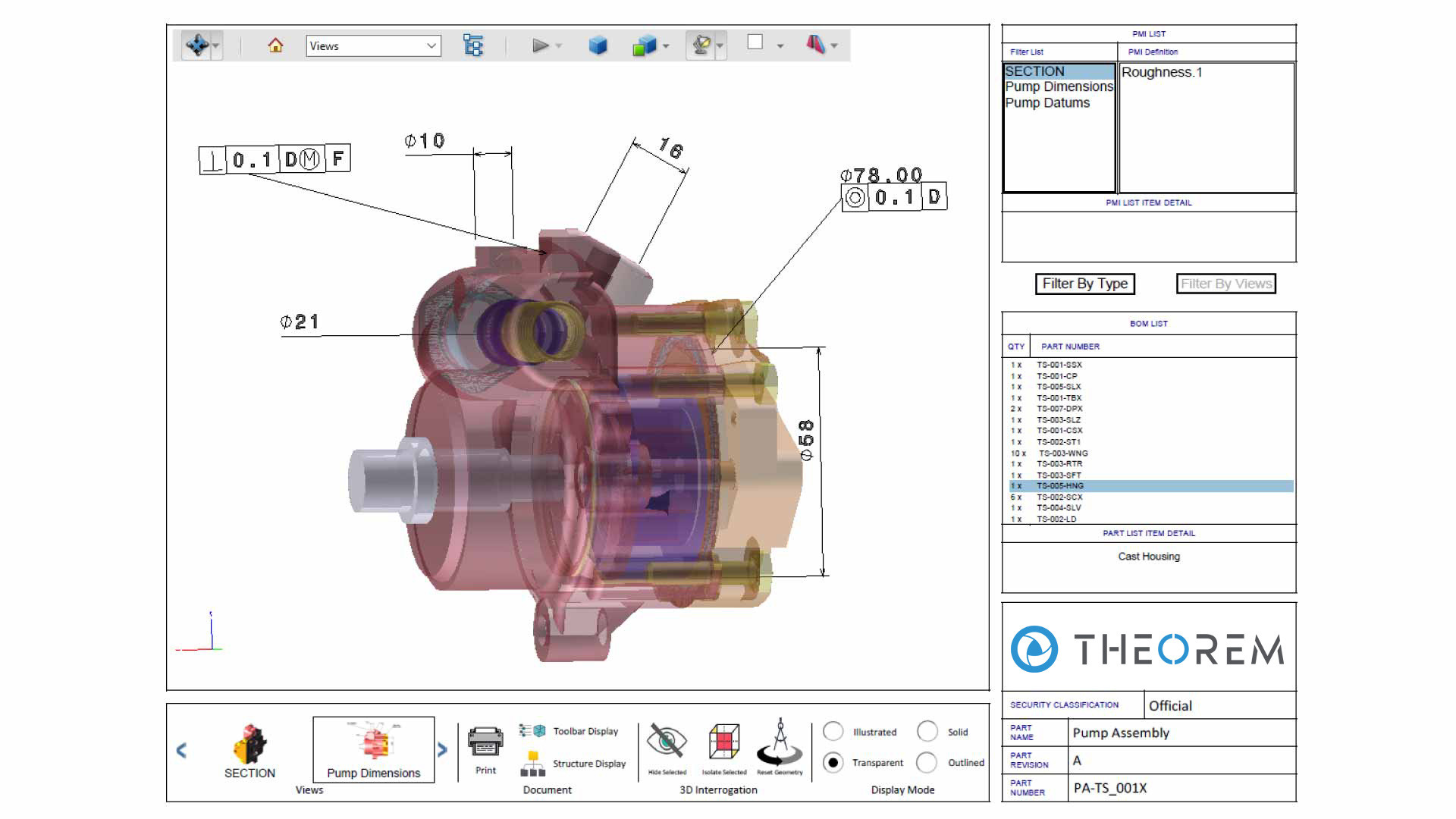
상호작용 3D 디자인 데이터 표현을 완전한 제품 제조 정보 (PMI)와 결합하여, 3D PDF 문서는 제조 과정에서 사용할 수 있으며, CAD 소스 데이터에서 2D 도면을 출력할 필요가 없습니다.
3D PDF는 제품의 더 철저한 이해를 가능하게 하며, 다른 보기를 통해 조사할 수 있도록 제공하며, 치수, 공차 및 표면 마감 정보를 제공합니다. 3D PDF 문서에 추가 정보(스프레드시트, 하이퍼링크, AVI 등)를 첨부할 수 있습니다. 그런 다음 내장된 3D 이미지를 사용하여 품목 수량, 비용 정보, 원자재 목록 등과 같은 추가 데이터를 사용하여 MBOM을 생성하고, 조직 및 공급망 전체에 공유할 수 있습니다.
협업
SpinFire Convert는 CATIA V5, CATIA 3DEXPERIENCE, Creo 또는 NX로 설계하는 조직이나, JT 데이터를 PDF로 매끄럽게 게시하고 3D 모델에 포함된 지능을 PDF 세계로 가져가려는 사람들에게 적합합니다. 즉, 누구든지 Adobe의 보편적인 Reader로 3D 데이터를 소비, 조회 및 주석을 달 수 있습니다. 특수 뷰어 소프트웨어를 설치하거나 특수 도구 사용을 위해 훈련받을 필요가 없습니다.
PDF는 내부 및 외부 협업 프로세스를 촉진하여 개발 과정을 가속화하고 제품을 더 빠르게 시장에 출시하는 데 도움을 줍니다. 3D는 모호함을 제거하고 간단한 문서가 모두가 볼 수 있고 탐색할 수 있는 3D 데이터를 포함하게 하여, 엔지니어링 전문가에 국한되지 않도록 합니다. SpinFire Convert는 단순히 '다른 이름으로 저장'을 통해 복잡한 CAD를 PDF 문서로 만듭니다. 하루에 수백 개 또는 수천 개의 문서를 게시해야 하는 사용자에게는 사용하기 쉽고 자동화된 출판 과정이 솔루션의 일부입니다.
PDF를 사용하면 비즈니스 파트너와의 협업 시 보안이 향상됩니다. PDF는 문서에 비밀번호 보호를 제공하여 지적 재산을 보호합니다. SpinFire Convert는 기업 외의 데이터를 안전하게 보호합니다.
SpinFire Convert는 확장 가능하며, 단순한 다른 이름으로 저장 도구에서부터 완전한 기업 고도로 출판 솔루션까지 제공하여 협업 팀이 네이티브 CAD 또는 PLM에서 직접 상호작용 3D 데이터를 포함한 문서를 빠르고 쉽게 생성할 수 있습니다.
향상된 협업은 데이터 교환을 매끄럽게 하고, 특히 설계 엔지니어의 설계 의도를 중요하게, 공급망 전반에 데이터를 분석하고 조립, 제품 비용, 구매, 품질, 도구 제작, 작업 설명서 및 마케팅에 대한 개선을 위해 최적화할 수 있게 합니다. 이는 확실히 리드 타임을 줄이고, 실수를 줄이며, 더 나은 제품으로 이어질 것입니다.
새로운 SpinFire Convert 기술의 특히 스마트한 기능 중 하나는 동일한 문서에 네이티브 CAD 파일을 포함하거나 패키징하여 공동 작업에 필요한 모든 정보가 포함된 하나의 PDF 문서를 게시할 수 있는 능력입니다.
데이터 검토
조직 내 거의 모든 부서가 프로세스 중 어느 시점에서든 제품의 설계를 논의할 필요가 있으며, 질문은 이를 보다 효율적으로 수행하는 방법과 기존 리소스를 활용하는 방법입니다?
제품 설계자는 조직 내의 여러 다른 부서와 긴밀한 업무 관계를 맺고 있습니다. 그들은 설계 및 의견 제공 검토를 위해 동료들과 초기 설계 개념/브리프를 공유하고 검토해야 하며, 3D PDF를 사용하여 이를 빠르고 쉽게 수행할 수 있어 전체 설계 주기를 가속화합니다.
무료로 제공되는 Adobe Reader에 3D 보기 기능을 포함하여 전 세계 누구든지 3D 데이터 교환 및 보기 기능을 사용할 수 있습니다.
데이터를 검토하기 위해 3D PDF를 사용하는 것은 다음과 같은 기능을 제공합니다:
주석: 필요한 경우 데이터를 변경하지 않고 추가 논평을 허용
저장된 뷰: 보기 세션의 다양한 반복 저장
단면화: 모델의 단면을 생성
폭발: 조립품을 분해하여 CAD 데이터의 세부 정보를 검사
부품 숨기기/보이기: 필요한 것만 보기
정상 화면명령: PDF 사용자가 친숙하게 사용할 수 있는
첨부 파일: 스프레드시트, AVI 및 하이퍼링크 등의 추가로 풍부한 데이터 패키지를 생성
오늘날 데이터 검토는 최신 디지털 3D 기술을 사용하여 협업으로 수행될 수 있으며, 전 세계적으로 다양한 개념을 검토하여 다양한 구성을 평가하고 새로운 디자인에 대한 최종 선택, 또는 기존 구성에 대한 변경 사항을 결정할 수 있도록 합니다.
데이터 교환
CAD 데이터 교환은 종종 프로젝트와 관련이 있으며 프로젝트 초기 탐색 단계에서는 OEM과 최상위 공급업체 간에만 발생할 수 있으며, 타당성 및 비용이 고려될 때 사람들 사이에서 제한적으로 전달됩니다.
협업 팀의 다른 구성원들 사이에서 CAD 데이터 교환의 타이밍, 볼륨 및 속도가 다를 뿐만 아니라 그 성질 또한 다릅니다. 예를 들어 RFQ(견적 요청) 단계에서 OEM은 키 티어 1 공급업체의 엔지니어들이 요구사항을 이해하고 응답을 개발할 수 있도록 네이티브 CAD 데이터, 대형 STEP 또는 JT 조립품을 보낼 수 있습니다. 이 데이터는 판매, 구매, 엔지니어링 및 수신 회사의 법무 부서에 프로젝트를 설명하는 많은 지원 텍스트 문서와 함께 제공될 수 있습니다.
이 모든 데이터는 단일 PDF로 전송될 수 있습니다. 이렇게 하면 관련 문서, PMI, 메타데이터 등이 모두 하나의 문서로 전달될 수 있습니다. 게다가 PDF는 CAD 무관성이 있기 때문에 CAD 라이센스가 필요하지 않으며, 무료 Adobe Reader만 있으면 누구나 읽을 수 있습니다. 이는 특히 기본적인 저비용 CAD 애플리케이션만을 사용할 수 있는 매우 작거나 틈새 제조 회사인 경우에 유용합니다.
모델 기반 정의
모델 기반 정의(Model-based definition, MBD)는 3D CAD 소프트웨어 내에서 3D 모델(예: 솔리드 모델, 3D PMI 및 관련 메타데이터)을 사용하여 개별 구성품 및 제품 조립품을 만드는 데 필요한 제조 데이터를 정의하는 관행입니다. 포함되는 정보 유형은 기하학적 치수 및 공차(GD&T), 구성품 수준의 재료, 조립 수준의 자재 명세서, 엔지니어링 구성, 설계 의도 등입니다. 대조적으로, 다른 방법론은 이러한 세부 정보를 제공하기 위해 전통적으로 2D 엔지니어링 도면을 동반 사용해야 했습니다.
현대 3D CAD 애플리케이션은 구성 요소 및 어셈블리에 대한 3D 디지털 데이터 세트에 치수, GD&T, 노트 및 기타 제품 세부 사항과 같은 엔지니어링 정보를 삽입할 수 있도록 허용합니다. MBD는 그러한 기능을 사용하여 3D 디지털 데이터 세트를 이러한 사양의 원천 및 제품의 설계 권위로 설정합니다. 3D 디지털 데이터 세트는 전통적으로 그러한 정보를 포함하는 것으로 알려진 엔지니어링 도면을 필요로 하지 않고 제품 제조 및 검사를 위한 충분한 정보를 포함할 수 있습니다.
많은 경우, 3D 디지털 데이터 세트의 일부 정보를 사용하는 것은 3D 프린팅과 같은 다양한 프로세스를 통한 제품의 신속한 프로토타이핑을 가능하게 합니다. 제조업체는 최종 제품을 제조하기 위해 3D 디지털 데이터를 CNC 기계와 같은 제조 장치로 직접 전송할 수 있습니다.
제품 수명주기의 시작에 MBD를 구현하고 조직 및 공급망 전체에서 재사용하여 제품의 신속하고 원활하며 비용 효율적인 개발 및 배포를 가능하게 합니다.
PMI
제품 제조 정보(Product Manufacturing Information, PMI)는 제품 구성 요소 및 조립품을 제조하는 데 필요한 3D 컴퓨터 지원 설계(CAD) 및 협업 제품 개발 시스템에서 비기하학적 속성을 전달합니다.
PMI는 기하학적 치수 및 공차, 3D 주석(텍스트) 및 치수, 표면 마감, 및 재료 사양을 포함할 수 있습니다. PMI는 데이터 세트 활용을 위해 2D 도면을 제거할 수 있도록 모델 기반 정의와 결합하여 사용됩니다.
SpinFire Convert는 단일 데이터 소스에서 다중 PDF 출판할 수 있는 기회를 제공합니다. 우리의 UI는 공학 데이터를 필터링, 조회, 탐색, 조작 및 상호작용 또는 배치로 번역할 수 있는 능력을 통해 번역 및 다운스트림 프로세스의 개발 및 간소화를 지원합니다.
보안
상호작용 3D 데이터를 포함한 PDF 파일은 문서를 비밀번호로 보호할 수 있도록 하여 네이티브 CAD 파일보다 더 높은 지적 재산(IP) 보안을 제공합니다.
네이티브 CAD 파일은 비밀번호로 보호할 수 없으며, 그러므로 공유되거나 액세스될 때 IP 취약성을 야기할 수 있습니다. 3D PDF를 사용하여, CAD 데이터는 기하학적 형식으로 변환되어 기능, 역사 및 제약 조건과 같은 콘텐츠가 제거되어 3D 표현을 보고 조작할 수 있지만, PDF 자체로부터 네이티브 CAD 데이터를 액세스하거나 재생산할 수 없습니다.
이러한 추가 기능은 민감한 정보를 협력업체 및 공급업체와 공유할 때 더 큰 신뢰를 제공합니다.
표준 Adobe PDF 보안을 사용하여 3D PDF는 다음을 수행할 수 있습니다:
비밀번호 보호
암호화
데이터 권한 관리 추가
LiveCycle, FileOpen 등의 다른 애플리케이션을 사용하여 특정 사용자에 대한 접근 제한
3D PDF는 문서에 주석을 달 수 있는 기능을 가지고 있으며, 스프레드시트, AVI 무비, 하이퍼링크, 네이티브 CAD 데이터 등을 운반하기 위한 '캐리어' 파일로 작동하여 더 풍부한 파일 및 정보 소스를 생성할 수 있지만 여전히 IP는 안전하게 유지합니다.
요약
3D PDF 형식은 데이터의 소비 및 공유 방식을 혁명적으로 변화시키고 있습니다. 기존 CAD 및 PLM 자산을 내부 및 외부 비 CAD 사용자와 레버리지하기 위한 간단하고 비용 효과적인 방법입니다. 더 중요하게는, 상호작용 형식의 사용이 모호함을 줄이고 의사소통을 개선하는 데 도움을 주며, 일상 엔지니어링 및 제조 설계 주기 프로세스를 가속화하고 단순화하고 있습니다. 이는 비용 절감, 시장 출시 시간 단축 및 제품 품질 향상에 도움을 주고 있습니다.
3D PDF는 조직이 크든 작든 기본 3D CAD 및 시각화 데이터를 사용하여 여러 다분야 응용 프로그램 영역으로 확장하고, 3D 기하학, 제품 구조 및 관련 메타데이터에 접근할 수 있어 다운스트림에서 다시 사용할 수 있는 기회를 제공하고 있습니다.
상호작용 기술 데이터 패키지로서 단일 문서를 활용하여 품질 손실 없이 제품의 3D 기술 콘텐츠를 보다 철저하게 이해할 수 있습니다. 이는 일반적으로 원시 엔지니어링 및 CAD 설계 데이터에 접근할 수 없는 직원들에게 유익합니다.
지적 재산이 비밀번호 보호 및 디지털 권한 관리로 3D PDF 형식에서 안전하게 유지됨에 따라, 여전히 보안에 대한 우려나 위험 없이 데이터를 교환할 수 있습니다.
3D PDF 형식은 제품 수명주기 전반에 걸쳐 엔지니어링 설계 데이터를 공유하고 소비하는 미래입니다.
Once published, using Adobe Acrobat Reader a user will be able to:
View the 3D model
Interrogate the model tree sub-assemblies
Turn components in assemblies on and off
Shade and render for technical authoring
View as a solid and wireframe
Cross section components and assemblies
A 3D PDF document is extremely lightweight and therefore easily emailed without the danger of it being blocked by a firewall or inbox capacity. Intellectual Property can also be exchanged in a PDF protecting the native data. A smarter way of exchanging your design data. SpinFire Convert can be configured to distribute CAD models in many different contexts for different departments (all in one process), for example:
As a solid assembly (rendered) for marketing
Hidden line removed for technical publication
An exploded view for customer service
Part of a bill of materials for purchasing
SpinFire Convert will run the process at the press of a button (or as part of an overnight batch process) and will create multiple documents for multiple users. It can also email the data exchange document or can upload it to an FTP site or the cloud.
In addition to the 3D model itself, there are many user-configurable features that lend themselves to an array of use cases.
Documentation
So, we have been able to ascertain that SpinFire Convert enables the publishing of 3D CAD and visualization data directly from within design applications into interactive 3D PDF documents. The published document output contains embedded interactive 3D representations of the native CAD data (within a pre-defined template).
These documents can be annotated and additional rich media such as PowerPoint files, video, hyperlinks to additional online information, and spreadsheet data can be auto-embedded or inserted manually. The PDF can also act like a .zip file to transport additional files, for example, native CAD data, purchasing documentation or statistical process control documentation.
Using SpinFire Convert enables you to create a range of interactive documentation including:
Works Instruction
Request for Quotation for Purchasing Departments
Technical Data Sheet
Technical Data Package – Archiving
Technical publications
Works Instruction
A complex, yet comprehensive approach to using the PDF format enabling interactive, step by step building capabilities for manufacturing in a single document.
The Works Instruction document in its simplest form can contain:
A stepped process, each step referencing its own unique data set and view
A 3D section showing an interactive representation of filtered geometry
Accompanying icons which help to reduce ambiguity where the language is an issue when needing to highlight specific requirements – i.e. hazardous area.
A means to show information alongside the 3D representation
The instructions for each process step.
Multi-lingual content to suit the audience based on geographical location
Process stages can contain filtered steps, based upon user permissions or required actions.
Additional Documentation can be attached to give context and clarity for defined operation states; each step can contain its own attached data set.
The Works Instruction template environment takes the capabilities of the 3D PDF format to the next level for sharing and consuming data.
Request for Quotation for Purchasing Departments
3D PDF for Purchasing departments offers the ability to present suppliers with crystal clear interactive 3D representations of products, components, sub-assemblies and specifications; removing ambiguity from the procurement process. The fully interactive three dimensional and two-dimensional elevation views empower purchasing departments to easily create and share RFQ documents, containing pre-populated forms and interactive 3D data published directly from native CAD data held on PLM systems.
An RFQ in its simplest form can contain:
Costing information
Material Information
Technical specifications
Briefing notes and care points
Interactive 3D geometry
Technical Data Sheet
Using the 3D PDF format to represent a Technical data sheet is revolutionizing how easily data can be gathered, displayed and interacted with. By incorporating the traditional characteristics of a technical data sheet within a 3D PDF document template as part of the creation process, the output and uses are dramatically enhanced.
A Technical Data Sheet traditionally summarizes the performance and other technical characteristics of a product, machine, component, material, etc. in sufficient detail that allows design engineers, for example, to understand the role of the ‘component’ within the overall design of the product. They generally have a very formal, yet static 2D layout which has been pulled together manually from disparate sources.
It is now possible to publish a single document containing a combination of data from a variety of sources, alongside an interactive representation of a 3D component, which is bringing new clarity to the technical detail and configuration specifications.
Highlighting a component and being able to instantly see where it fits into the overall product assembly, costings, materials, etc. is bringing a new dimension to the traditional technical data sheet.
Technical Data Package – Archiving
Being able to attach files to a standard PDF file immediately changes how it can be utilized within a business. Suddenly, what was a document, can be classed as a rich in content, technical data package that can be used for archiving.
You can attach Jpegs, Spreadsheets, and Drawings, Movies or even native CAD and Visualization files! Attachments can be launched directly from within the PDF helping to give context and clarity, and using Adobe’s built-in compression engine, the ‘package’ remains a portable format that is still easily emailed, unlike ZIP and RAR type packages that can get be blocked by an organization due to potential security risks.
With the addition of password protection and digital rights management (DRM) for added security, 3D PDF is a very rich and easy way to communicate and consume data up and down any supply chain as well as archive complete project and design data in a single secure document.
Technical Publications
Inspection Reports for Quality and Inspection Departments
The creation of final Inspection documentation, containing interactive 3D Data using the PDF format, significantly enhances and simplifies the QA reporting function needed for components to pass quality control and move into production.
An interactive 3D representation of a specific part or component, combined with additional metadata-part descriptions, part numbers, detailed drawings and proposed changes- and created as part of the inspection process that can be annotated, with findings highlighted and shared between departments is a very powerful information communication tool indeed.
The 3D representation can be used as an additional check of inspection; visually showing what has been inspected or what needs to be inspected.
Using a QA report template that can be populated directly from source data; with data that can be pulled from all necessary departments within an organization, as well as being attached to create a data package, reduces the time needed to locate all required documents and drawings helping to improve the QA process.
Engineering Change Request for Engineering Departments
3D PDF is the perfect mechanism to use for an Engineering Change Request Document. An interactive 3D PDF can be used to inform and update others within the Engineering department that modifications to a component are required, without needing specialist CAD or viewing applications to see the change(s) and give relevant approvals.
As with the Inspection Reports, the addition of an interactive 3D representation of a specific part or component, combined with additional metadata, proposed changes, and created as part of the ECR process that can be annotated, with notes highlighted and then shared, is a very powerful, yet simple communication tool.
As PDF doesn’t require the use of a license of Vis-Mockup to load CAD data into a specific application, for example, time will be saved and costs reduced, especially as the all necessary information can be contained and attached within a single document (technical data package); simplifying the sign off process.
Bill of Materials (BOM) for Manufacturing Departments
When the product lifecycle is at the manufacturing stages, it is essential that staff have all the necessary pieces of information that are required to put in place the manufacturing processes needed for production.
Most of this information will be passed down from the design engineers, who will have designed the product using a CAD system. But the manufacturing engineers need more than just the design visual, they need the rest of the product information, such as dimensions and materials etc. and unless they know how to use a CAD system, they may have difficulty in accessing and understanding it. Sharing data in its native digital form requires specialist resource and training. The more traditional paper route can equally be as problematic. Both routes can be expensive and time-consuming and often require input from Engineering to make sense of the data.
Combining interactive 3D design data representations with full Product Manufacturing Information (PMI), 3D PDF documents can be used during the manufacturing process, removing the requirement for 2D drawings to be output from the CAD source data.
3D PDF allows a more thorough understanding of the product due to different views being available for interrogation, along with dimensional, tolerance, and surface finish information. Additional information can be attached to the 3D PDF document (such as spreadsheets, hyperlinks, AVI’s etc.). You can then use the 3D image embedded and any additional data, such as quantities, and cost information, and lists of raw materials, to create an MBOM, which can be shared throughout the organization and the supply chain.
Collaborate
SpinFire Convert enables organizations who design with CATIA V5, CATIA 3DEXPERIENCE Creo or NX, or who want to extend the use of their JT data to seamlessly publish that 3D data as a PDF, and take the intelligence contained within a 3D model into the world of PDF. That means anybody can consume, view and mark-up 3D data with Adobe’s ubiquitous Reader. It eliminates the need to install specialist viewing software or to be trained to use a special tool.
PDF facilitates the collaboration process internally and externally, helping speed up the development process and getting products to market faster. 3D eliminates ambiguity and enables simple documents to carry 3D data which can be viewed and interrogated by everybody in the process, not just engineering specialists. With SpinFire Convert just doing a simple “save as”, this puts complex CAD into a PDF document. For users who need to publish 100’s or 1000’s of documents a day, a simple-to-use and automated publishing process is part of the solution.
Using PDF improves security when collaborating with business partners. PDF secures the data by providing password protection to the document, protecting your intellectual property. SpinFire Convert makes sure that outside of the enterprise your data is secure.
SpinFire Convert is scalable, it provides a simple save as tool, up to a full enterprise high volume publishing solution enabling collaborative teams to quickly and easily create documentation containing interactive 3D data published directly from native CAD or PLM.
Improved collaboration will result in seamless exchanges of data and more importantly, design intent from the design engineer. This data can be analyzed up and down the supply chain and optimized for improvements to assembly, product cost, purchasing, quality, tool making, work instructions and marketing. This will undoubtedly lead to reduced lead-times, fewer mistakes and better products.
One exceptionally smart function of the new SpinFire Convert technology is the ability to embed or package native CAD files in the same document, publishing one PDF document with every piece of collaborative information required.
Data Review
Almost every department within an organization will need to discuss a product’s design at some point along the process; the question is how this can be done more efficiently and utilizing existing resource?
Product designers have a close working relationship with many different departments within an organization. They create the initial design concept/brief which would then need to be shared with colleagues to review and assess the design and provide their own input and feedback. Using 3D PDF makes this quick and easy and so speeds up the whole design cycle.
By embedding 3D viewing capability into the freely available Adobe Reader, 3D data exchange and 3D viewing become available to anyone in the world.
Using 3D PDF to review data offers the following functionalities:
Annotations: allows additional comments to be added to the data if required and saves changing the source data.
Saved views: save various iterations of a viewing session
Sectioning: create a cross-section of the model
Explode: examine the finer detail of the CAD data by breaking the assembly down
Hide/show parts: only see what is necessary
Standard out of the box commands- familiar to regular PDF users
Attachments: the addition of spreadsheets, AVI’s and hyperlinks etc. create a rich data package
Data reviews today can be conducted collaboratively using the latest digital 3D technologies, enabling multiple concepts to be reviewed by departments globally, to evaluate different configurations before settling on final options for new designs, or changes to existing configurations.
Data Exchange
CAD Data Exchange is often project related, and at the early exploratory stages of a project it may only take place between OEM and top Tier suppliers, and only passed between a limited set of people as feasibility and costs are considered.
Not only do the timing, volume and rate of CAD data being exchanged vary between different members of the collaboration team, it varies in its nature. For example, at RFQ (request for quotation) stage an OEM may send native CAD data, a large STEP or JT assembly to a number of key Tier 1 suppliers to enable the engineers in those companies to understand the requirement and to develop their response. This data may be accompanied by a significant number of supporting text documents that describe the project for sales, purchasing, engineering and legal departments in the companies that receive the RFQ.
All of this data could be sent as a single PDF. This way all of the related documentation, PMI, metadata etc. can all travel in a single document. In addition to this, as the PDF is CAD agnostic, it doesn’t even need a CAD license, just the free Adobe Reader- anyone can read it. This is particularly useful if one of the receiving companies is a very small or niche manufacturing company that may only be using basic low-cost CAD applications.
Model-Based Definition
Model-based definition (MBD) is the practice of using 3D models (such as solid models, 3D PMI and associated metadata) within 3D CAD software to define the manufacturing data that is needed to make individual components and product assemblies. The types of information included are Geometric Dimensioning and Tolerancing (GD&T), component level materials, assembly level bills of materials, engineering configurations, design intent, etc. By contrast, other methodologies have historically required accompanying use of 2D engineering drawings to provide such details.
Modern 3D CAD applications allow for the insertion of engineering information such as dimensions, GD&T, notes and other product details within the 3D digital data set for components and assemblies. MBD uses such capabilities to establish the 3D digital data set as the source of these specifications and design authority for the product. The 3D digital data set may contain enough information to manufacture and inspect product without the need for engineering drawings (which have traditionally contained such information).
In many instances, use of some information from 3D digital data set allows for rapid prototyping of product via various processes, such as 3D printing. A manufacturer may be able to feed 3D digital data directly to manufacturing devices such as CNC machines to manufacture final products.
Implementing MBD at the beginning of the product lifecycle and re-using it throughout an organization and its supply chain enables quick, seamless and cost-effective development and deployment of products.
PMI
Product manufacturing information (PMI) conveys non-geometric attributes in 3D computer-aided design (CAD) and Collaborative Product Development systems necessary for manufacturing product components and assemblies.
PMI may include geometric dimensions and tolerances, 3D annotation (text) and dimensions, surface finish, and material specifications. PMI is used in conjunction with the 3D model within a model-based definition to allow for the elimination of 2D drawings for data set utilization.
SpinFire Convert provides the opportunity for multiple PDF publishing from a single data source. Our UI helps the development and streamlining of translation and downstream processes by allowing engineering data to be filtered, viewed, interrogated, manipulated and translated interactively or in batches with the ability to publish user-specific documentation.
Security
PDF files containing interactive 3D data provide a higher level of Intellectually Property (IP) security than native CAD files by allowing the documents to be password protected.
Native CAD files cannot be password protected, causing IP vulnerabilities when shared or accessed. Using 3D PDF, the CAD data can be translated into a tessellated format, with content such as features, history and constraints being removed, so that the 3D representation can be viewed and manipulated, but the native CAD data cannot be accessed or reproduced from the PDF alone.
This added functionality gives greater confidence when sharing sensitive information with partners and suppliers.
Using standard Adobe PDF security, a 3D PDF can be:
Password protected
Encrypted
Data Rights Management added
Restricted access for specific users with other applications such as LiveCycle, FileOpen etc.
A 3D PDF has the capability for the document to be annotated, and can also act as a ‘carrier’ file for additional data to be transported (such as spreadsheets, AVI Movies, hyperlinks, as well as native CAD data) and create a richer file and source of information, but still keep IP secure.
Summary
The 3D PDF format is revolutionizing the consumption and sharing of data. It is a simple and cost-effective method to leverage existing CAD and PLM assets with non-CAD users internally and externally. More importantly, the use of the interactive format is helping to reduce ambiguity and improve communication, whilst speeding up and simplifying day to day engineering and manufacturing design cycle processes. This, in turn, is helping to reduce costs, time to market and improving product quality.
3D PDF is enabling organizations of all sizes to extend the use of their native 3D CAD and Visualization data into numerous multi-disciplinary application areas and for downstream re-use that can benefit from access to 3D geometry, product structure and associated metadata.
Being able to utilize a single document as an interactive technical data package without loss of quality, is allowing a more thorough understanding of the 3D technical content of the product by staff who would not normally have access to raw engineering and CAD design data.
With Intellectual Property remaining secure in the 3D PDF format using password protection and digital rights management, data can still be exchanged without concern or risk to security.
The 3D PDF format is the future of data sharing and consumption of engineering design data throughout a product lifecycle.