
3D PDF ガイド
で紹介されているツールがいくつかありますが、 SpinFire Convert ファミリーの中で、この記事は3D PDFに焦点を当てています。もちろん、PDFファイルが何かを知っていますよね? それは、Microsoft WordやPowerPointのようなものから変換されたドキュメントで、著者がその内容を共有できるようにするためのものです。それだけではないのです。実際にはそれ以上のものです。
Portable Document Format (PDF) は、Adobe によって 1990 年代に開発されたファイル形式で、アプリケーションソフト、ハードウェア、オペレーティングシステムに依存せずに、ドキュメントを表示するためのものです。各 PDF ファイルは、固定配置のフラットドキュメントの完全な説明を包含しており、テキスト、フォント、ベクトル グラフィックス、ラスタ画像、および表示に必要なその他の情報を含んでいます。 PDFは 2008 年にオープン形式 ISO 32000 として標準化されました。
今日では、PDF ファイルには、論理構造要素や注釈やフォームフィールドなどのインタラクティブ要素、レイヤー、リッチメディア(ビデオコンテンツを含む)、および三次元オブジェクトを含む、フラットなテキストとグラフィックス以外の多様なコンテンツを含めることができます。 PDF仕様は、暗号化とデジタル署名、ファイル添付、メタデータをワークフローの要求する機能を可能にするために提供しています。このドキュメントの目的で最も注目しているのは、三次元オブジェクトの要素です。
3D PDF について知らない場合は、3D コンテンツは静止画像であるか、または GIF のように回転できるオブジェクトであると仮定することは許されます。実際には、3D PDF の現実とその力は非常に素晴らしいものです。
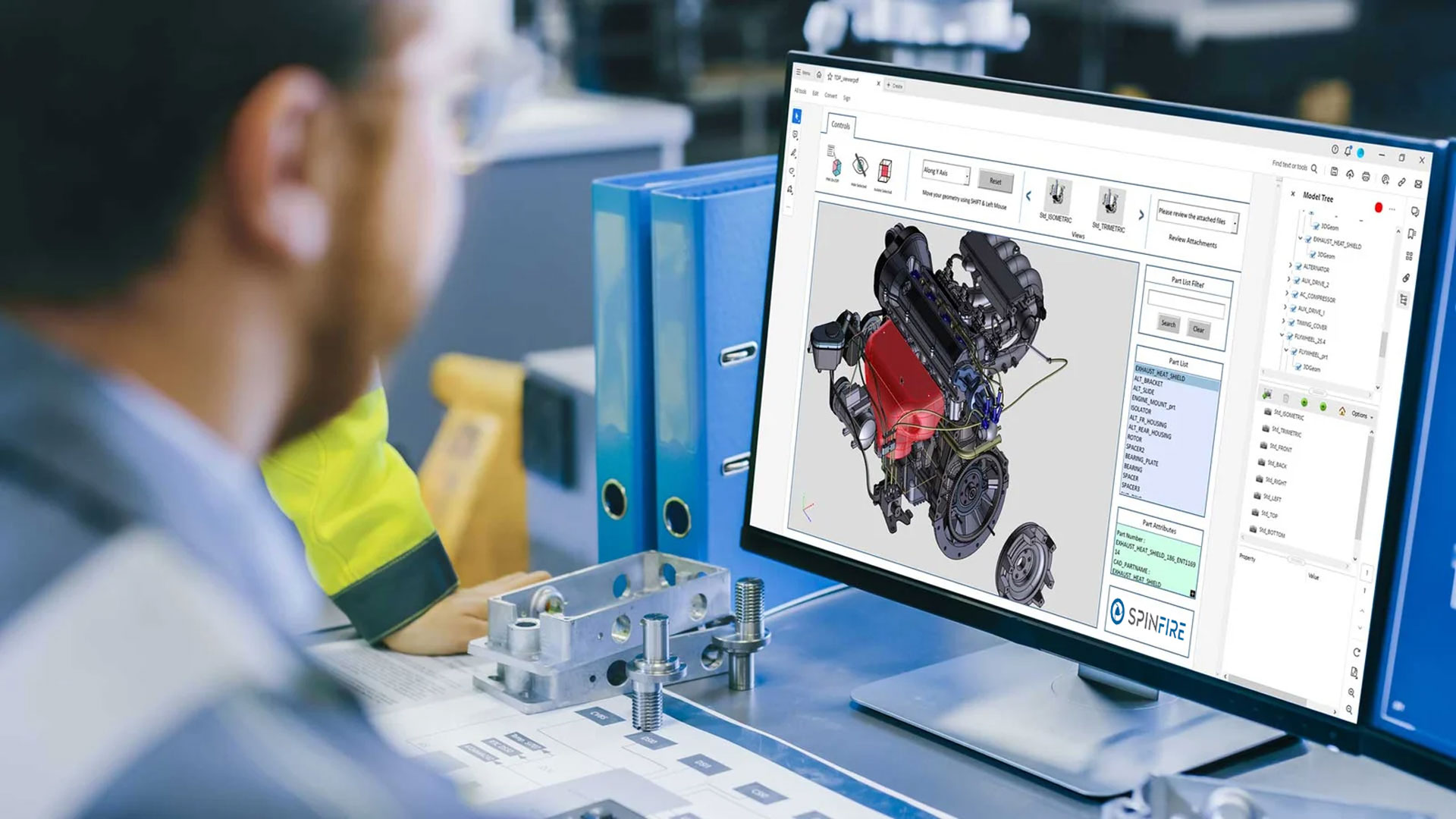
これを完全に理解するために、ぜひ一つを試してみてください。こちらが、サンプルの3D PDFファイルです。現在見えているものを説明する最良の方法は、これはドキュメント内の CAD であり、まるで PDF ドキュメントがはるかに強力な製品を内部に隠しているラッパーのようなものです!

SpinFire Convert は誰向けに設計されているのか?
3D PDF を利用したインテリジェントなドキュメント化と情報交換の新時代が到来する中で、SpinFire Convert はそのプロセスに関与し、3D データを読み取り、表示し、マークアップすることが必要な誰にとっても有効なツールであり、CAD や PLM データ資産への投資を活用して開発プロセスをスピードアップします。これにより、組織やサプライチェーン内の人々がクリエイティブプロセスを視覚化し、調査し、貢献することが可能になります。そして、ますます競争の激しい市場において、戦略的な優位性を得ることができます。
SpinFire Convert は、CATIA V5、CATIA 3DEXPERIENCE、Creo、NX で設計する組織、または 3D モデルでのPDF コラボレーションを望む組織向けに、PDF を使用してビジネスパートナーとのコラボレーション時のセキュリティを向上させます。 PDF はドキュメントにパスワード保護を提供することで、データを保護し、知的財産を保護します。SpinFire Convert は、企業の外部でもデータが安全であることを保証します。
SpinFire Convert は拡張可能であり、単純な「名前を付けて保存」ツールから、企業全体での高ボリュームな発行ソリューションに至るまでの機能を提供し、協力チームが直接ネイティブ CAD や PLM から公開されたインタラクティブな 3D データを含むドキュメントをすばやく簡単に作成できるようにします。
SpinFire Convert の利点は?
この技術の美しさは、部署、顧客、サプライヤーを製品ライフサイクルプロセスに統合する際の障壁を取り除くという、導入のシンプルさと使いやすさにあります。
組織内とサプライチェーンがクリエイティブプロセスを視覚化し、調査し、貢献することができるシナリオを想像してください。
この新しい技術を採用して CAD や PLM 資産を活用することによって戦略的優位性を獲得する機会を過小評価するべきではありません。
なぜインタラクティブ 3D PDF を使用するのですか?
3D PDF ファイル内に含まれるインタラクティブな 3D データは、ネイティブ CAD データにアクセスしないユーザーおよび部門が、追加のインストールされたアプリケーションやその動作の知識を必要とせずに 3D 表示を必要とする際に、アドビの無料の Acrobat Reader を使用して共有、表示、調査できる。公開された後、Adobe Acrobat Reader を使用することで、ユーザーは以下を行うことができます:
3D モデルを表示
モデル ツリーのサブアセンブリを調査
アセンブリ内のコンポーネントのオン/オフを切り替え
技術著作のためのシェードとレンダリング
ソリッドおよびワイヤーフレームとして表示
構造物およびアセンブリの断面を作成
3D PDF ドキュメントは非常に軽量であるため、ファイアウォールや受信トレイの容量によってブロックされる危険性なく簡単にメール送信できます。知的財産も PDF 内で保護することでネイティブデータを守ることができます。設計データを交換するよりスマートな方法です。SpinFire Convert は、たとえば以下の異なる部門用に CAD モデルをさまざまな文脈で配布するように構成できます(すべて単一のプロセスで):
マーケティング用のソリッドアセンブリ (レンダリング済み)
技術的な出版のために隠された線を削除
カスタマーサービス向けの分解表示
購買用の部品表の一部として
SpinFire Convert はボタンを押すだけで(または夜間バッチプロセスの一部として)プロセスを実行し、複数のユーザー向けに複数のドキュメントを生成します。データ交換ドキュメントをメール送信したり、FTPサイトやクラウドにアップロードしたりすることもできます。
3D モデル自体に加え、多くのユーザー設定可能な機能が多数の使用事例に適応できるようになっています。
ドキュメント化
したがって、SpinFire Convert は設計アプリケーション内から直接3D CADと可視化データを公開し、インタラクティブな3D PDFドキュメントに変換できることを確認できました。公開されたドキュメントの出力には、ネイティブ CAD データの埋め込まれたインタラクティブな 3D 表示が含まれており(事前定義されたテンプレート内で)。
これらのドキュメントは注釈を付けることができ、PowerPoint ファイル、ビデオ、追加のオンライン情報へのハイパーリンク、およびスプレッドシート データなどのリッチ メディアを自動的に埋め込むことまたは手動で挿入することができます。PDF は.zip ファイルのように追加ファイルを転送する手段としても機能することができ、例えば、ネイティブ CAD データ、購買ドキュメント、または統計プロセス制御ドキュメントを運ぶことができます。
SpinFire Convert を使用することで、以下を含むインタラクティブなドキュメンテーションの範囲を作成できます:
作業指示
購買部門用の見積もり依頼
技術データシート
技術データパッケージ – アーカイブ
技術出版物
作業指示
PDFフォーマットを利用して製造工程のステップごとの構築機能をインタラクティブに提供することで複雑でありながら包括的なアプローチを可能にします。
作業指示ドキュメントはそのシンプルな形式で以下を含むことができます:
各ステップが独自のデータセットとビューを参照するステッププロセス
フィルタリングされたジオメトリのインタラクティブな表示を示す3Dセクション
特定の要求を強調する必要がある場合に言語が問題となる場合に曖昧さを減らすのに役立つアイコン
3D 表示の横に情報を表示する手段
各プロセスステップの指示
地理的位置に基づいてオーディエンスに適応する多言語コンテンツ
プロセス段階はユーザーの権限または必要なアクションに基づいてフィルタリングされたステップを含むことができます。
追加の文書を添付して定義された操作状態に対する文脈と明確さを提供することができ、各ステップは独自の添付データセットを含むことができます。
作業指示テンプレート環境はデータを共有および消費するための3D PDFフォーマットの機能を次のレベルに引き上げます。
購買部門用の見積もり依頼
購買部門用の3D PDF を使用すると、製品、部品、サブアセンブリ、および仕様のインタラクティブな3D表示をサプライヤーに提供でき、調達プロセスの曖昧さを排除します。完全にインタラクティブな3次元および2次元の立面図は、購買部門がネイティブ CAD データから直接公開されたあらかじめ入力されたフォームとインタラクティブな3Dデータを含む RFQ ドキュメントを簡単に作成および共有することを可能にします。
その最も簡単な形の RFQ は以下を含むことができます:
コスト情報
材料情報
技術仕様
説明ノートおよび注意点
インタラクティブな3Dジオメトリ
技術データシート
3D PDF フォーマットを使って技術データシートを表現することは、データの収集、表示、インタラクションを如何に容易にするかを革新しています。技術データシートの伝統的な特性を3D PDFドキュメントテンプレート内に含めることで、作成プロセスの一環としてアウトプットと使用が劇的に向上します。
技術データシートは伝統的に設計者が製品の全体的な設計内で「コンポーネント」の役割を理解できるようにするための製品、機械、部品、材料などの性能およびその他の技術的特性を詳細に要約しています。それらは通常、非常に形式的で静的な2Dレイアウトを持っており、異なる情報源から手動でまとめられています。
現在では、様々な情報源からのデータを組み合わせ、3Dコンポーネントのインタラクティブな表示と共に1つのドキュメントを公開することが可能です。これにより、技術的詳細および構成仕様に新たな明瞭さがもたらされています。
コンポーネントを強調し、それが製品全体のアセンブリ、コスト、材料などにどのように収まるかを即座に視覚することは、従来の技術データシートに新たな次元をもたらしています。
技術データパッケージ – アーカイブ
標準の PDF ファイルにファイルを添付することができることは、すぐにその使用法をビジネス内でどのように利用できるかを変えます。突然、ドキュメントであったものが、多くのコンテンツを含む技術データパッケージとしてアーカイブに利用されることができます。
JPEG、スプレッドシート、図面、映画、またはネイティブ CAD や可視化ファイルを添付できます! 添付ファイルは PDF 内から直接起動できるため、文脈と明確さをもたらし、Adobe の組み込みの圧縮エンジンの使用により、’パッケージ’ は容易にメール送信可能な перенос可能な形式を維持します。これは、ZIP や RAR タイプのパッケージなどが潜在的なセキュリティリスクのために組織によってブロックされる可能性があることに比べて有益です。
追加のセキュリティのためにパスワード保護およびデジタル著作権管理 (DRM) を追加することで、3D PDF はサプライチェーン全体でデータを柔軟に伝達および消費する非常に豊かであり簡単な方法であり、プロジェクトおよび設計データを安全なドキュメントとしてアーカイブできます。
技術出版物
品質および検査部門向けの検査レポート
PDFフォーマットを使用してインタラクティブな3Dデータを含む最終検査ドキュメントを作成することで、品質管理を通過して生産に移行するために必要 な QA 報告機能が大幅に向上し、簡素化されます
特定の部分またはコンポーネントのインタラクティブな 3D 表示を、追加のメタデータ (部品の説明、部品番号、詳細な図面、提案された変更) と組み合わせ、検査プロセスの一部として作成し、それに注釈を付け、発見内容を強調し、部門間で共有することができる。これは非常に強力な情報伝達ツールです。
3D 表示は、検査の追加チェックとして使用できます。何が検査されたか、または何を検査する必要があるかを視覚的に表示します。
ソースデータから直接取得できるQAレポートテンプレートを使用し、組織内のすべての必要な部門からデータを取得し、データパッケージを作成するための 添付することで、必要なすべてのドキュメントおよび図面を取得するための時間とQAプロセスの改善に役立ちます。
技術部門用の技術変更要求
3D PDF は技術変更要求ドキュメントに使用するのに最適なメカニズムです。インタラクティブな 3D PDF は、CAD または視覚化アプリケーションのスペシャリストの閲覧アプリケーションを必要とせず、必要な変更を確認し関連する承認を得ることができるように、技術部内の他のメンバーに部品に変更が必要であることを知らせ、最新情報を提供するために使用されます。
検査レポートと同様に、特定の部品またはコンポーネントのインタラクティブな3D表現を追加し、追加されたメタデータ、提案された変更、およびECRプロセスの一部として作成されたものに注釈を付け、ノートを強調表示して共有することは、非常に強力ですがシンプルなコミュニケーションツールです。
PDF は、CAD データを特定のアプリケーションにロードするために Vis-Mockup のライセンスを使用する必要がないため、例として挙げられるように、時間を節約し、コストを削減することができます。特に必要なすべての情報を単一の文書 (技術データパッケージ) に含め添付することができ、簡潔な承認プロセスを可能にします。
製造部門向けの部品表 (BOM)
製品ライフサイクルが製造段階に達したとき、スタッフが生産に必要な製造プロセスを確立するために必要なすべての情報を持っていることが不可欠です。
この情報のほとんどは、CAD システムを使用して製品を設計した設計者から伝達されます。しかし、製造エンジニアは設計ビジュアル以上のものを必要とします。彼らは寸法、材料などの製品情報も必要とし、CAD システムの使用方法がわからない場合、それにアクセスし理解するのに苦労する可能性があります。ネイティブデジタル形式のデータを共有するには、専門のリソースとトレーニングが必要です。従来の紙ベースの方法も同様に問題を引き起こす可能性があります。どちらの方法も高価で時間がかかり、エンジニアリングからの入力が必要な場合があります。
インタラクティブな 3D 設計データの表示を完全な製品製造情報 (PMI) と組み合わせ、3D PDF ドキュメントを製造プロセス中に使用し、CADソースデータから 2D 図面を出力する必要性を排除します。
3D PDF は製品のより完全な理解を可能にし、多様なビューポイントを使用して調査できるなど、次元、公差、表面仕上げ情報を含めることができます。3D PDF文書には、スプレッドシート、ハイパーリンク、AVI などの追加情報を添付できます。その後、埋め込まれた 3D 画像や、その追加データ(例えば、数量、コスト情報、原材料リスト)を使用して、MBOM を作成し、組織とサプライチェーン全体で共有することができます。
コラボレート
SpinFire Convert は CATIA V5、CATIA 3DEXPERIENCE、Creo、NX で設計する組織に、JT データの使用を拡張することで、その 3D データを PDF にシームレスに公開し、3D モデルの持つインテリジェンスを PDF の世界に持ち込むことができる。このため、誰でも Adobe の無料の Reader を使用して 3D データの消費、表示、マークアップが可能で、特別な表示ソフトウェアのインストールや特別なツールの使用のためのトレーニングが不要となります。
PDF は内部および外部のコラボレーションプロセスを促進し、開発プロセスを加速させ、市場への製品投入を迅速化します。三次元は曖昧さを排除し、十分に理解可能なドキュメントを作成できます。SpinFire Convert の単純な「名前を付けて保存」を行うだけで、PDF ドキュメントに複雑な CAD を入れることができます。毎日何百または何千ものドキュメントを公開する必要があるユーザーにとって、簡単で自動化された公開プロセスがソリューションの一部になります。
PDF を使用することで、ビジネスパートナーと協力する場合のセキュリティが向上します。PDF はドキュメントにパスワード保護を提供し、知的財産を保護します。SpinFire Convert は、企業の外部でもデータが安全であることを保証します。
SpinFire Convert は拡張可能であり、単純な「名前を付けて保存」ツールから、企業全体での高ボリュームな発行ソリューションに至るまでの機能を提供し、協力チームが直接ネイティブ CAD や PLM から公開されたインタラクティブな 3D データを含むドキュメントをすばやく簡単に作成できるようにします。
改善されたコラボレーションは、データのシームレスな交換および設計エンジニアの設計意図のより重要な交換をもたらします。このデータはサプライチェーン全体で分析され、組み立て、製品コスト、購買、品質、工具製作、作業指示、およびマーケティングの改善に最適化されます。これにより、リードタイムの短縮、ミスの削減、および製品の品質向上が確実に行われます。
新しい SpinFire Convert 技術の非常に賢い機能の 1 つは、ネイティブ CAD ファイルを同じドキュメントに埋め込んだりパッケージ化したりし、必要な協力情報のすべてを持つ 1 つの PDF ドキュメントを公開する能力です。
データレビュー
ほぼすべての部門がプロセスのどこかで製品の設計を議論する必要があります。問題は、これをいかに効率的に行い、既存のリソースを活用するかということです。
製品設計者は、組織内のさまざまな部門と緊密に協力しています。彼らは、設計コンセプト/ブリーフを作成し、その後、同僚に共有して設計をレビューし、評価し、独自の入力やフィードバックを提供します。3D PDF を使用することでこれが迅速かつ容易になり、設計サイクル全体を加速します。
無料で提供されている Adobe Reader に 3D 表示機能を埋め込むことで、3D データ交換と 3D 表示は世界中の誰もが利用可能になります。
3D PDF を使用してデータをレビューすることにより、次の機能が提供されます:
注釈:データに追加コメントを追加し、元のデータを変更せずに保存できます。
保存したビュー:表示セッションのさまざまなイテレーションを保存
セクショニング:モデルの断面を作成
分解:アセンブリを分解してCADデータの詳細を調べる
パーツの非表示/表示:必要なものだけを見る
標準のアウトオブボックスコマンド - 通常のPDFユーザーに馴染みのあるもの
添付ファイル:スプレッドシート、AVI、ハイパーリンクなどの追加により、豊かなデータパッケージが作成される
今日のデータレビューは、最新のデジタル3D技術を使用して共同で実施でき、多くのコンセプトが組織全体の部門によってレビューされ、最終的な選択肢を決定する前に新しい設計や既存の構成変更を評価できます。
データ交換
CAD データ交換は多くの場合、プロジェクトと関連しており、プロジェクトの初期探査段階では、OEM と主要サプライヤーの間でのみ行われ、可用性とコストを考慮して限られた人々にだけ共有されます。
協力チームのメンバーごとに交換される CAD データのタイミング、ボリューム、および換算率は異なるだけでなく、その性質も異なります。たとえば、RFQ (見積り依頼) の段階では、OEM がネイティブ CAD データや大規模な STEP または JT アセンブリをいくつかの主要なティア 1 サプライヤーに送信し、彼らのエンジニアが要件を理解し対応の開発を行えるようにします。このデータは、営業部門、購買部門、技術部門、法務部門に渡されるプロジェクト説明書きのテキストドキュメントと共に送られることがあります。
すべてのデータを1つのPDFとして送信することも可能です。この方法では、関連するすべての文書、PMI、メタデータなどが1つのドキュメントに収まります。PDFはCADに依存しないため、CADライセンスすら必要とせず、無料のAdobe Readerがあれば誰でも読むことができます。これは、受信する会社の1つが非常に小規模で、低コストの基本的な CAD アプリケーションしか使用していない場合に特に有用です。
モデルベース定義
モデルベース定義(MBD)は、3D CADソフトウェア内で三次元モデル(ソリッドモデル、3D PMI、および関連メタデータなど)を使用して、個々の部品および製品アセンブリを作成するために必要な製造データを定義する方法です。 含まれる情報の種類には、幾何公差 (GD&T)、部品レベルの材料、アセンブリレベルの部品表、エンジニアリング設定、設計意図などがあります。一方、これまでの他の方法論では、2D エンジニアリング図面の併用が必要とされていました。
現代の 3D CAD アプリケーションでは、寸法、GD&T、ノート、その他の製品の詳細をコンポーネントおよびアセンブリの 3D デジタルデータセット内に挿入することができます。MBD はこのような機能を活用して、製品の仕様のソースとして 3D デジタルデータセットを確立し、製品の設計権限とします。 3D のデジタルデータセットは、エンジニアリング図面(従来はそのような情報を含めていた)を必要とせずに製品を製造および検査するのに十分な情報を含む場合があります。
多くの場合、3D デジタル データセットからの一部の情報の使用により、3D プリンティングなどのさまざまなプロセスを介して製品の迅速なプロトタイピングが可能になります。メーカーは 3D デジタルデータを直接製造装置(例えば CNC 機械)に供給し、最終製品を製造することができます。
製品ライフサイクルの初期段階で MBD を導入し、組織とそのサプライチェーン全体で再利用することで、製品の開発と展開の迅速でシームレスかつコスト効率の高い方法を実現します。
PMI
製品製造情報(PMI)は、製品のコンポーネントおよびアセンブリを製造するために必要な非幾何学的属性を3Dコンピュータ支援設計(CAD)および共同製品開発システムで伝えます。
PMI には幾何寸法および公差、3D 注記(テキスト)および寸法、表面仕上げ、および材料仕様が含まれる場合があります。 PMIは3Dモデルと共に使用され、データセットの利用において2D図面を排除します。
SpinFire Convert は、単一のデータソースから複数のPDF発行を可能にします。私たちのUIは、エンジニアリングデータをフィルタリング、表示、調査、操作、および翻訳でき、ユーザー固有のドキュメントの公開が可能な翻訳および下流プロセスの開発と合理化を支援します。
セキュリティ
インタラクティブな3Dデータを含むPDFファイルは、ドキュメントをパスワードで保護することで、ネイティブCADファイルよりも高い知的財産(IP)セキュリティを提供します。
ネイティブ CAD ファイルはパスワードで保護できないため、共有またはアクセス時にIPの脆弱性を引き起こします。 3D PDF を使用すると、CAD データをテッセレーション形式に変換し、機能、履歴、および制約などのコンテンツを削除することで、3D 表示ができなくなるため、PDF だけではネイティブ CAD データにアクセスしたり再生したりすることはできません。
この追加された機能により、パートナーやサプライヤーとの機密情報の共有に対してより高い信頼感が得られます。
標準の Adobe PDF セキュリティを使用すると、3D PDF を以下のようにすることができます:
パスワードで保護
暗号化
データ権利管理を追加
LiveCycle や FileOpen などの他のアプリケーションとともに特定ユーザーのアクセスを制限
3D PDF にはドキュメントに注釈が付ける機能があり、また、スプレッドシート、AVI 映画、ハイパーリンク、およびネイティブ CAD データなどの追加データを転送するための「キャリア」ファイルとして機能し、より豊かなファイルと情報源を作成しつつ、IPを安全に保つことができます。
まとめ
3D PDF フォーマットはデータの消費および共有方法を革命的に変えています。これは、内部および外部の非 CAD ユーザーと既存の CAD および PLM 資産を活用する簡単で費用対効果の高い方法です。より重要なのは、インタラクティブ形式を使用することで曖昧さを減らし、コミュニケーションを改善しながら、日常的なエンジニアリングおよび製造デザインサイクルプロセスを迅速かつ簡素化するのに役立っていることです。これにより、コストの削減、市場投入までの時間の短縮、製品品質の向上につながります。
3D PDF により、あらゆる規模の組織がネイティブ 3D CAD および可視化データの使用を多様な学際的なアプリケーション領域に拡張し、3D ジオメトリ、製品構造および関連メタデータへのアクセスから利益を得ることができるダウンストリーム再利用が可能になります。
品質を損なうことなくインタラクティブな技術データパッケージとして単一のドキュメントを利用できることは、通常は生のエンジニアリングおよびCAD設計データにアクセスしないスタッフが製品の3D技術コンテンツをより完全に理解することを可能にします。
知的財産は、パスワード保護とデジタル著作権管理を使用した 3D PDF フォーマットで保護されたままであり、データはセキュリティの懸念やリスクなしで交換できます。
3D PDF フォーマットは、製品ライフサイクル全体を通してエンジニアリングデザインデータの共有および消費の未来です。
Once published, using Adobe Acrobat Reader a user will be able to:
View the 3D model
Interrogate the model tree sub-assemblies
Turn components in assemblies on and off
Shade and render for technical authoring
View as a solid and wireframe
Cross section components and assemblies
A 3D PDF document is extremely lightweight and therefore easily emailed without the danger of it being blocked by a firewall or inbox capacity. Intellectual Property can also be exchanged in a PDF protecting the native data. A smarter way of exchanging your design data. SpinFire Convert can be configured to distribute CAD models in many different contexts for different departments (all in one process), for example:
As a solid assembly (rendered) for marketing
Hidden line removed for technical publication
An exploded view for customer service
Part of a bill of materials for purchasing
SpinFire Convert will run the process at the press of a button (or as part of an overnight batch process) and will create multiple documents for multiple users. It can also email the data exchange document or can upload it to an FTP site or the cloud.
In addition to the 3D model itself, there are many user-configurable features that lend themselves to an array of use cases.
Documentation
So, we have been able to ascertain that SpinFire Convert enables the publishing of 3D CAD and visualization data directly from within design applications into interactive 3D PDF documents. The published document output contains embedded interactive 3D representations of the native CAD data (within a pre-defined template).
These documents can be annotated and additional rich media such as PowerPoint files, video, hyperlinks to additional online information, and spreadsheet data can be auto-embedded or inserted manually. The PDF can also act like a .zip file to transport additional files, for example, native CAD data, purchasing documentation or statistical process control documentation.
Using SpinFire Convert enables you to create a range of interactive documentation including:
Works Instruction
Request for Quotation for Purchasing Departments
Technical Data Sheet
Technical Data Package – Archiving
Technical publications
Works Instruction
A complex, yet comprehensive approach to using the PDF format enabling interactive, step by step building capabilities for manufacturing in a single document.
The Works Instruction document in its simplest form can contain:
A stepped process, each step referencing its own unique data set and view
A 3D section showing an interactive representation of filtered geometry
Accompanying icons which help to reduce ambiguity where the language is an issue when needing to highlight specific requirements – i.e. hazardous area.
A means to show information alongside the 3D representation
The instructions for each process step.
Multi-lingual content to suit the audience based on geographical location
Process stages can contain filtered steps, based upon user permissions or required actions.
Additional Documentation can be attached to give context and clarity for defined operation states; each step can contain its own attached data set.
The Works Instruction template environment takes the capabilities of the 3D PDF format to the next level for sharing and consuming data.
Request for Quotation for Purchasing Departments
3D PDF for Purchasing departments offers the ability to present suppliers with crystal clear interactive 3D representations of products, components, sub-assemblies and specifications; removing ambiguity from the procurement process. The fully interactive three dimensional and two-dimensional elevation views empower purchasing departments to easily create and share RFQ documents, containing pre-populated forms and interactive 3D data published directly from native CAD data held on PLM systems.
An RFQ in its simplest form can contain:
Costing information
Material Information
Technical specifications
Briefing notes and care points
Interactive 3D geometry
Technical Data Sheet
Using the 3D PDF format to represent a Technical data sheet is revolutionizing how easily data can be gathered, displayed and interacted with. By incorporating the traditional characteristics of a technical data sheet within a 3D PDF document template as part of the creation process, the output and uses are dramatically enhanced.
A Technical Data Sheet traditionally summarizes the performance and other technical characteristics of a product, machine, component, material, etc. in sufficient detail that allows design engineers, for example, to understand the role of the ‘component’ within the overall design of the product. They generally have a very formal, yet static 2D layout which has been pulled together manually from disparate sources.
It is now possible to publish a single document containing a combination of data from a variety of sources, alongside an interactive representation of a 3D component, which is bringing new clarity to the technical detail and configuration specifications.
Highlighting a component and being able to instantly see where it fits into the overall product assembly, costings, materials, etc. is bringing a new dimension to the traditional technical data sheet.
Technical Data Package – Archiving
Being able to attach files to a standard PDF file immediately changes how it can be utilized within a business. Suddenly, what was a document, can be classed as a rich in content, technical data package that can be used for archiving.
You can attach Jpegs, Spreadsheets, and Drawings, Movies or even native CAD and Visualization files! Attachments can be launched directly from within the PDF helping to give context and clarity, and using Adobe’s built-in compression engine, the ‘package’ remains a portable format that is still easily emailed, unlike ZIP and RAR type packages that can get be blocked by an organization due to potential security risks.
With the addition of password protection and digital rights management (DRM) for added security, 3D PDF is a very rich and easy way to communicate and consume data up and down any supply chain as well as archive complete project and design data in a single secure document.
Technical Publications
Inspection Reports for Quality and Inspection Departments
The creation of final Inspection documentation, containing interactive 3D Data using the PDF format, significantly enhances and simplifies the QA reporting function needed for components to pass quality control and move into production.
An interactive 3D representation of a specific part or component, combined with additional metadata-part descriptions, part numbers, detailed drawings and proposed changes- and created as part of the inspection process that can be annotated, with findings highlighted and shared between departments is a very powerful information communication tool indeed.
The 3D representation can be used as an additional check of inspection; visually showing what has been inspected or what needs to be inspected.
Using a QA report template that can be populated directly from source data; with data that can be pulled from all necessary departments within an organization, as well as being attached to create a data package, reduces the time needed to locate all required documents and drawings helping to improve the QA process.
Engineering Change Request for Engineering Departments
3D PDF is the perfect mechanism to use for an Engineering Change Request Document. An interactive 3D PDF can be used to inform and update others within the Engineering department that modifications to a component are required, without needing specialist CAD or viewing applications to see the change(s) and give relevant approvals.
As with the Inspection Reports, the addition of an interactive 3D representation of a specific part or component, combined with additional metadata, proposed changes, and created as part of the ECR process that can be annotated, with notes highlighted and then shared, is a very powerful, yet simple communication tool.
As PDF doesn’t require the use of a license of Vis-Mockup to load CAD data into a specific application, for example, time will be saved and costs reduced, especially as the all necessary information can be contained and attached within a single document (technical data package); simplifying the sign off process.
Bill of Materials (BOM) for Manufacturing Departments
When the product lifecycle is at the manufacturing stages, it is essential that staff have all the necessary pieces of information that are required to put in place the manufacturing processes needed for production.
Most of this information will be passed down from the design engineers, who will have designed the product using a CAD system. But the manufacturing engineers need more than just the design visual, they need the rest of the product information, such as dimensions and materials etc. and unless they know how to use a CAD system, they may have difficulty in accessing and understanding it. Sharing data in its native digital form requires specialist resource and training. The more traditional paper route can equally be as problematic. Both routes can be expensive and time-consuming and often require input from Engineering to make sense of the data.
Combining interactive 3D design data representations with full Product Manufacturing Information (PMI), 3D PDF documents can be used during the manufacturing process, removing the requirement for 2D drawings to be output from the CAD source data.
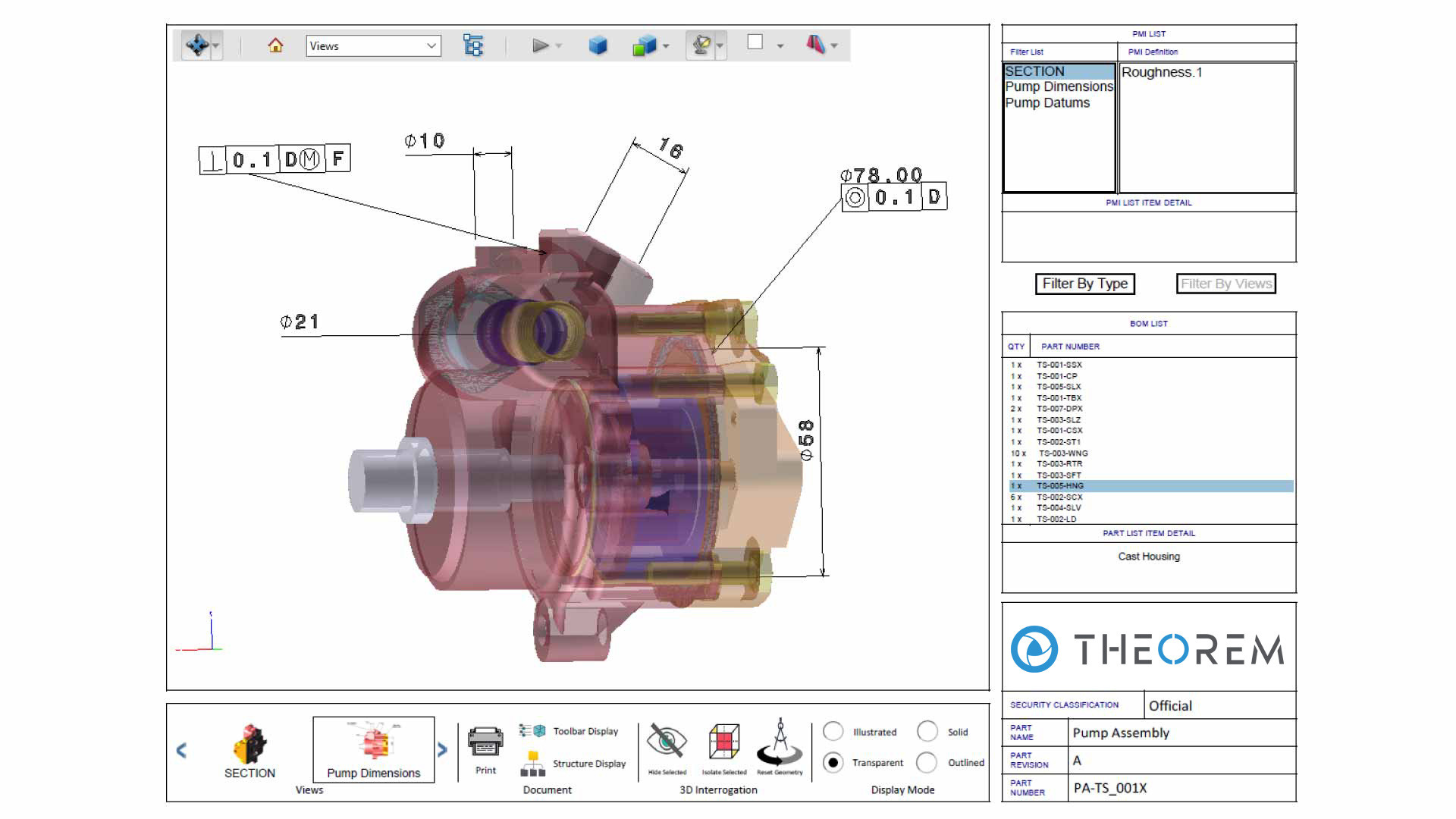
3D PDF allows a more thorough understanding of the product due to different views being available for interrogation, along with dimensional, tolerance, and surface finish information. Additional information can be attached to the 3D PDF document (such as spreadsheets, hyperlinks, AVI’s etc.). You can then use the 3D image embedded and any additional data, such as quantities, and cost information, and lists of raw materials, to create an MBOM, which can be shared throughout the organization and the supply chain.
Collaborate
SpinFire Convert enables organizations who design with CATIA V5, CATIA 3DEXPERIENCE Creo or NX, or who want to extend the use of their JT data to seamlessly publish that 3D data as a PDF, and take the intelligence contained within a 3D model into the world of PDF. That means anybody can consume, view and mark-up 3D data with Adobe’s ubiquitous Reader. It eliminates the need to install specialist viewing software or to be trained to use a special tool.
PDF facilitates the collaboration process internally and externally, helping speed up the development process and getting products to market faster. 3D eliminates ambiguity and enables simple documents to carry 3D data which can be viewed and interrogated by everybody in the process, not just engineering specialists. With SpinFire Convert just doing a simple “save as”, this puts complex CAD into a PDF document. For users who need to publish 100’s or 1000’s of documents a day, a simple-to-use and automated publishing process is part of the solution.
Using PDF improves security when collaborating with business partners. PDF secures the data by providing password protection to the document, protecting your intellectual property. SpinFire Convert makes sure that outside of the enterprise your data is secure.
SpinFire Convert is scalable, it provides a simple save as tool, up to a full enterprise high volume publishing solution enabling collaborative teams to quickly and easily create documentation containing interactive 3D data published directly from native CAD or PLM.
Improved collaboration will result in seamless exchanges of data and more importantly, design intent from the design engineer. This data can be analyzed up and down the supply chain and optimized for improvements to assembly, product cost, purchasing, quality, tool making, work instructions and marketing. This will undoubtedly lead to reduced lead-times, fewer mistakes and better products.
One exceptionally smart function of the new SpinFire Convert technology is the ability to embed or package native CAD files in the same document, publishing one PDF document with every piece of collaborative information required.
Data Review
Almost every department within an organization will need to discuss a product’s design at some point along the process; the question is how this can be done more efficiently and utilizing existing resource?
Product designers have a close working relationship with many different departments within an organization. They create the initial design concept/brief which would then need to be shared with colleagues to review and assess the design and provide their own input and feedback. Using 3D PDF makes this quick and easy and so speeds up the whole design cycle.
By embedding 3D viewing capability into the freely available Adobe Reader, 3D data exchange and 3D viewing become available to anyone in the world.
Using 3D PDF to review data offers the following functionalities:
Annotations: allows additional comments to be added to the data if required and saves changing the source data.
Saved views: save various iterations of a viewing session
Sectioning: create a cross-section of the model
Explode: examine the finer detail of the CAD data by breaking the assembly down
Hide/show parts: only see what is necessary
Standard out of the box commands- familiar to regular PDF users
Attachments: the addition of spreadsheets, AVI’s and hyperlinks etc. create a rich data package
Data reviews today can be conducted collaboratively using the latest digital 3D technologies, enabling multiple concepts to be reviewed by departments globally, to evaluate different configurations before settling on final options for new designs, or changes to existing configurations.
Data Exchange
CAD Data Exchange is often project related, and at the early exploratory stages of a project it may only take place between OEM and top Tier suppliers, and only passed between a limited set of people as feasibility and costs are considered.
Not only do the timing, volume and rate of CAD data being exchanged vary between different members of the collaboration team, it varies in its nature. For example, at RFQ (request for quotation) stage an OEM may send native CAD data, a large STEP or JT assembly to a number of key Tier 1 suppliers to enable the engineers in those companies to understand the requirement and to develop their response. This data may be accompanied by a significant number of supporting text documents that describe the project for sales, purchasing, engineering and legal departments in the companies that receive the RFQ.
All of this data could be sent as a single PDF. This way all of the related documentation, PMI, metadata etc. can all travel in a single document. In addition to this, as the PDF is CAD agnostic, it doesn’t even need a CAD license, just the free Adobe Reader- anyone can read it. This is particularly useful if one of the receiving companies is a very small or niche manufacturing company that may only be using basic low-cost CAD applications.
Model-Based Definition
Model-based definition (MBD) is the practice of using 3D models (such as solid models, 3D PMI and associated metadata) within 3D CAD software to define the manufacturing data that is needed to make individual components and product assemblies. The types of information included are Geometric Dimensioning and Tolerancing (GD&T), component level materials, assembly level bills of materials, engineering configurations, design intent, etc. By contrast, other methodologies have historically required accompanying use of 2D engineering drawings to provide such details.
Modern 3D CAD applications allow for the insertion of engineering information such as dimensions, GD&T, notes and other product details within the 3D digital data set for components and assemblies. MBD uses such capabilities to establish the 3D digital data set as the source of these specifications and design authority for the product. The 3D digital data set may contain enough information to manufacture and inspect product without the need for engineering drawings (which have traditionally contained such information).
In many instances, use of some information from 3D digital data set allows for rapid prototyping of product via various processes, such as 3D printing. A manufacturer may be able to feed 3D digital data directly to manufacturing devices such as CNC machines to manufacture final products.
Implementing MBD at the beginning of the product lifecycle and re-using it throughout an organization and its supply chain enables quick, seamless and cost-effective development and deployment of products.
PMI
Product manufacturing information (PMI) conveys non-geometric attributes in 3D computer-aided design (CAD) and Collaborative Product Development systems necessary for manufacturing product components and assemblies.
PMI may include geometric dimensions and tolerances, 3D annotation (text) and dimensions, surface finish, and material specifications. PMI is used in conjunction with the 3D model within a model-based definition to allow for the elimination of 2D drawings for data set utilization.
SpinFire Convert provides the opportunity for multiple PDF publishing from a single data source. Our UI helps the development and streamlining of translation and downstream processes by allowing engineering data to be filtered, viewed, interrogated, manipulated and translated interactively or in batches with the ability to publish user-specific documentation.
Security
PDF files containing interactive 3D data provide a higher level of Intellectually Property (IP) security than native CAD files by allowing the documents to be password protected.
Native CAD files cannot be password protected, causing IP vulnerabilities when shared or accessed. Using 3D PDF, the CAD data can be translated into a tessellated format, with content such as features, history and constraints being removed, so that the 3D representation can be viewed and manipulated, but the native CAD data cannot be accessed or reproduced from the PDF alone.
This added functionality gives greater confidence when sharing sensitive information with partners and suppliers.
Using standard Adobe PDF security, a 3D PDF can be:
Password protected
Encrypted
Data Rights Management added
Restricted access for specific users with other applications such as LiveCycle, FileOpen etc.
A 3D PDF has the capability for the document to be annotated, and can also act as a ‘carrier’ file for additional data to be transported (such as spreadsheets, AVI Movies, hyperlinks, as well as native CAD data) and create a richer file and source of information, but still keep IP secure.
Summary
The 3D PDF format is revolutionizing the consumption and sharing of data. It is a simple and cost-effective method to leverage existing CAD and PLM assets with non-CAD users internally and externally. More importantly, the use of the interactive format is helping to reduce ambiguity and improve communication, whilst speeding up and simplifying day to day engineering and manufacturing design cycle processes. This, in turn, is helping to reduce costs, time to market and improving product quality.
3D PDF is enabling organizations of all sizes to extend the use of their native 3D CAD and Visualization data into numerous multi-disciplinary application areas and for downstream re-use that can benefit from access to 3D geometry, product structure and associated metadata.
Being able to utilize a single document as an interactive technical data package without loss of quality, is allowing a more thorough understanding of the 3D technical content of the product by staff who would not normally have access to raw engineering and CAD design data.
With Intellectual Property remaining secure in the 3D PDF format using password protection and digital rights management, data can still be exchanged without concern or risk to security.
The 3D PDF format is the future of data sharing and consumption of engineering design data throughout a product lifecycle.